Showing posts with label google. Show all posts

Wednesday, January 30, 2013

Nexus 7 Rooted via the Nexus 7 Toolkit

0 comments
Nexus 7
Last night I did something brave.  Something I swore I wouldn't do for a while after I purchased my Nexus 7.  Apparently, I lied to myself.  As I a little better than a month out of my ownership of my Nexus 7, and today it is rooted.  This isn't a definitive walkthrough.  But it will hit the high spots.  And we can do it in about 4 steps that make the rooting process so easy it's almost ridiculous.  Be warned, the rooting process does perform a factory reset during the process which means all of your user data and apps will be erased from the device.  Please backup any information or data you may need before starting the rooting process.  Read below.


Step 1: Drivers

First thing first, you need the ADB drivers for your Nexus 7.  This can be accomplished one of a couple of ways.  Way #1: download the Nexus 7 Toolkit and let it install the correct drivers for you.  I attempted this, and it didn't work for me.  I am using Windows 8, and I had read there were some funny issues about Nexus 7 driver installation under Windows 8.  So I had to go to Way #2.

Way #2 is manually downloading the drivers from the ASUS site (click here).  This will download the USB Driver Package to your PC.  Simply unzip this file to a folder you can easily find.  Then open Windows Explorer, right click Computer and click on Properties.  Look for the link in the properties box that says "Device Manager".  Look for an entry that had a yellow caution sign beside it that reads "Nexus 7".

Right Click the "unknown" Nexus 7 device and select to Update the driver.  Follow the wizard and point it to the USB Driver that you downloaded and unzipped.  This should fix the driver issue.

Step 2: USB Debugging has to be Enabled

On the Nexus 7 the "Developer Options" menu has been hidden.  To access is, open the "Settings" app on your Nexus 7, tap on "About Tablet".  Find "Build Number" and tap 7 times.  You will see a prompt counting down how many taps until you become a "developer".  This unlocks the "Developer Options Menu".  Now tap your back button to return to the "Settings" menu and then tap into the "Developer Options" menu.  Locate "USB Debugging" and enable it.

Step 3: Download and Install the Nexus 7 Toolkit

This is where the magic is going to happen but you have to be running this from a Windows PC with the drivers mentioned above (unless you let the toolkit install drivers for you).  Visit XDA Developer's Nexus 7 section and download the Nexus 7 Toolkit.  There is a lot of good information on this page, and if you have any desire to root and load custom ROMs on your device then please frequent XDA.  XDA is a great community for this kind of thing.  Anyways, click here to visit the thread about the Nexus 7 Toolkit and download it.  Once you have downloaded it, install it.  It will place a shortcut on your desktop for future use.

Step 4: Hook it all up!

Hook your Nexus 7 up to a USB Cable and your PC.  Launch the newly installed Nexus 7 Toolkit.  And you'll be greeted with a window that has a black background and green text asking if you want to check for an update to the toolkit (select No).  Then select your build of Android (if you aren't sure go back into your Nexus 7 settings and click on "About Tablet" it will tell you Android 4.2 or 4.2.1 or other).  Back in the ToolKit enter the number option that matches your version of Android.  For example, mine was 4 for Android 4.2.1.

If the Toolkit see's your tablet, your tablet's serial number will be just bove the main menu.  If you see it there, you're in good shape (see the pic below).  I selected #8 from the menu for "1-CLICK for ALL...".  Essentially, it will go through an automated process of unlocking the bootloader, rooting, renaming the recovery, installing custom recovery and busybox.  The whole process takes less than 10 minutes to finish.  It is prompted.  So just follow the instructions as the program prompts you.  The Toolkit will handle all rebooting of the Nexus 7 and installation of all software as needed during the process.  So basically sit back, answer a few prompts and let it ride until it is done.  Once the process is finished your Nexus 7 will reboot and the program will prompt that the rooting was successful.

If you are curious that it infact worked, download one of the many Root Checker apps from the Google Play Store and check.  Now you can flash custom ROMs and run apps that require root access.  One of my reasons for rooting was to use my PS3 controller for some of my tablet's games.  But we'll cover that in another post.

Links used:

Nexus 7 Toolkit from XDA-Developers (does not require site registration)

Wednesday, January 2, 2013

Nexus 7 Review

0 comments
Nexus 7
Shortly after Christmas, I found myself purchasing a Nexus 7 tablet.  And believe me when I say they were few and far between in our local brick and mortar stores.  In early December I saw them on sale at a two of our local Walmart stores.  But apparently they were a pretty hot item this year.  I ended up finding one at a Gamestop about 30 miles away.

Needless to say, it was well worth the near 60 mile round trip.  So here is my quick review.

First up, like most tablets or mobile devices; there are several different versions of the device.  The Nexus 7 was made by Asus for Google (as Google doesn't produce hardware themselves).  The Nexus 7 is a 7 inch, Tegra 3 tablet and it comes in three flavors.
- 16GB Wifi only                               (MSRP: $199.00)
- 32GB Wifi only                               (MSRP: $249.00)
- 32GB Wifi & 3G (3G via AT&T)     (MSRP: $299.00)

Most of the local brick & mortar stores around here carry the 32GB WiFi only model for $249.  At first, $249 may sound a little steep.  But when compared to the price of devices like the Kindle Fire HD or the Nook HD it's still pretty much in the same price range.  And from the software perspective, the Nexus 7 is quite a bit more open (out of the box) than either Amazon or Barnes & Noble's offerings.

The market definitely has no shortage of tablets and mobile computing devices, so what makes the Nexus 7 stand out?  For me, it's the software that jumps out at me.  The Nexus 7 runs Android 4.1 (Jelly Bean) out of the box.  So big deal, it runs the latest version of Android... Who cares?  Well, most Android based devices include apps that aren't used of wanted.  Smartphone's are the same way.  My Galaxy S2 from Sprint came preloaded with Sprint branded apps and even a couple games that I didn't really care to have on my device without my choice.

This doesn't happen with the Nexus 7, reason being it runs pure Android without any vendor UI overlay or without any Vendor specific apps preloaded.  What you do get preinstalled on the devices are the apps from Google that are run of the mill on Android devices:
-Google Play Store (and associated apps)

So what about the specs:
- Tegra 3 Quad-Core Processor
-1GB of RAM
-Storage Capacity: 16GB or 32GB
-WiFi 802.11 b/g/n
-Bluetooth
-NFC
-3G only available is the 3G model
-Front Facing 1.2MP camera
-4325 mAh Battery (rated at approximately 8 hours of battery life)
Screen Specs:
-7 inch (1280 x 800) at 216ppi
-Back-lit IPS display

Other Features:
-Microhone
-Accelerometer
-Magnetometer
-GPS
-Gyroscope

You may have read through those specs and said: "What a minute, where is the SD Card slot or the rear facing camera?!".  And you'd be right, the Nexus 7 does not sport either of those.  And to be honest with you, I haven't even missed them.  Here's why.  My phone has a 8MP camera on it.  The majority of my pictures are taken while I am out and about in the world on a daily basis.  I have a 10 inch Android Tablet that sports both of the Nexus 7's missing features and I rarely use them.  I have taken less than 10 pictures with my 10 inch tablet's rear camera.  I use the SD card slot only to load a small collection of ROM's to play.  That's it.  So not having these two features didn't hinder me from picking up the Nexus 7.
OTG Cable

And if these missing features might deter you from checking out the Nexus 7, then don't let it.  Because there is a work around for the missing SD Card slot.  You can pick up what is called an "On the Go" USB adapter.  There are a couple types of these available on Amazon.  The popular one basically splits the micro-USB connector on the bottom of the device into two USB ports that allows you to connect Flash Drives for extra storage of file transfers (although some of the file transfer features will require ROOT access).  That means it is still possible to swap files on the fly.  Albeit, with an extra cable.  The good news is that most of these adapters are really dirt cheap.  And there is even one that has a card reader/USB/HDMI Output on it as well.

So enough about the specs, how does it perform?  So far I have read books on the Nexus 7, watched quite a bit of Netflix programming on it, surfed the web and social networks, and yes; I have indulged in quite a few games as well.  Everything works just as smooth as silk.  The games I have played so far include:
-Need for Speed Most Wanted
-Dark Meadow: The Pact
-Sonic 4 Episode II THD
-Beach Buggy Blitz
-Marvel's Avengers Initiative

And every game has been fast, no lag, responsive and an overall fantastic experience. I am excited to load up the multiplayer version of Shadowgun to see it in all it's glory.  One of the common complaints tends to be more with the apps from Google Play; as not all of them are designed to work on a 7 inch display.  What I mean is the Facebook app downloaded from Google Play is essentially the same as the phone version of the app.  This has been an issue with Android pretty much since Day 1.  They call that "fragmentation" and is one of the large reason's Apple fans slam Android fanboys.  For me, there are so many other awesome apps out there, I can't let the quirks with just a couple hinder my overall experience on something that really isn't the tablet's issue in the first place.

The 7 inch screen size is perfect for reading books, as it feels like using a paperback sized book.  And the tablet is pretty light (weighing in at 340g) so you can easily hold it with one hand and not tired of holding it.  And when paired with books from Google Play (or as I prefer to use Aldiko), it really feels great kicking back on the couch with a good book on the Nexus 7.

Battery Life
Sure, it's got great specs with a great screen size and can run movies and games without a problem.  The battery life must be terrible, right?  Nope.  In fact, the battery life is the best I have seen on an Android device this size.  For example, over the weekend I pretty much carried the Nexus 7 with me everywhere I went.  I haven't altered any of the display or power settings from their default settings.  At the end of the day Saturday, I looked at the Battery usage and it had been off of the charger for a little better than 9.5 hours and I was still showing around 32% battery left.  My usage that day was connecting to three different WiFi connections, web surfing/Facebooking for a while on each.  Did some lite reading, used the web surfing to find resources and information on PC repair for a friend, watching YouTube, playing Need for Speed Most Wanted, and later that evening watching an episode of "Sons of Anarchy" on Netflix.

That is way more activity than my phone could handle without begging for a charge midway through the day. So you shouldn't have to worry about battery life.  If you can charge it up before bed, you'll not have much to worry about.  The only issue I can forsee is that the battery is enclosed (much like the iPad devices).  So you can't replace it when it's charge cycles are used up.  Hopefully, by the time that happens; it'll be time to upgrade devices anyway.

Cons
The Nexus 7 only has one downside that I have found thus far and I wanted to save it for last.  And really, it isn't that big of a deal (it can be resolved); but out of the box it may be an issue for some people.  The Nexus 7 has one speaker bar in the bottom of the back of the device.  Out of the box with the volume turned all the way up, it is still somewhat difficult to hear the audio anywhere but in a semi-quiet room.  You can however download a Speaker Booster app from Google Play that will fix this.  So not a serious issue by any means.

Overall Verdict: Must Buy!
Today marks 1 week spent with the Nexus 7, and I haven't regretted purchasing it yet.  It is a great device, offering the latest and greatest that Google has to offer on the software side.  And the awesome specs that Asus slammed into the Nexus 7's casing.  I honestly gave thought to initially purchasing the iPad Mini.  But with it's price point higher than the Nexus 7's, and the fact I really didn't like the idea of having to use iTunes again.  So I veered away from Apple's offering.  And honestly, I'm glad that I did.

For more information on the Nexus 7 please visit:
Google Play's Nexus 7 Product Page

Monday, September 10, 2012

Apple vs Samsung = $1 Billion Bruise for Samsung

0 comments
Apple vs Samsung
Before jumping into this, let me first and foremost say that I love my Samsung Galaxy S2.  It is an amazing device, and probably the best phone I have ever owned (and yes, I have used Apple products before).  If you have read any of my posts, you'll know that I am a proponent for Android (mostly because it will built ontop of Linux).  And yes, I will admit that there are striking resemblances between my Galaxy S2 and my wife's Apple iPhone 4S (mostly in terms of interface design).

If you have kept up with any of the news surrounding the Apple/Samsung patent lawsuits you'll know that Apple was recently awarded $1 billion big one's for basically admitting that they copied the iPhone design.  So, I'll have to say I kind of saw this one coming.  And knowing that Samsung is getting hit in the pocketbook for their admitted plagiarism of Apple's hardware, it was no surprise that the patents will be upheld and we will probably be seeing some big changes to some of the basics of even how Android works across the board.

So what is affected by the results of this lawsuit?  For starters, this lawsuit will not just affect Samsung products, but in the end will affect Android at the OS level as well.  As obviously, Google will try to steer clear of Apple patented design traits.  No more dedicated home buttons on Samsung hardware (they were notorious on some of their phones to have a rectangular home button).  Things like app icon design will more than likely change as well just for beginners.  But things like the "swipe to unlock" bars, various multitouch gestures, etc.  This is a big deal people.

So it sounds pretty bad doesn't it?  Let's look at it from a different angle.  Maybe this is a good thing.  Maybe this lawsuit is what it took to get some innovation back into our mobile devices.  Let's admit it, for the last several years the world has laid in wait to see what latest gimmicks Apple's latest phone gives us.  And then you start to see similar things show up in other places.  So we have let Apple be the innovation leader in the mobile device market.  Maybe now is when our mobile devices meet a "theoretical" fork-in-the-road where new interface designs, new product features, and new phone designs in general could pop-up and even succeed.  Let's face it.  A lot of Android user's like and use Android because it is different than Apple.  And because it isn't an Apple product, point blank.  Yet, our devices are starting to look more and more like Apple devices anyways.  Maybe it is a well warranted time for a change.

Personally, I feel the growing pains and changes may suck initially.  Hopefully, Samsung won't outright nerf many features; simply reworking them with Google's assistance in a Jelly Bean update would be nice. Being realistic and knowing how the whole Android development/release cycle works, I think I may be living in a dream.  But eventually, we may be seeing the start of an Android rebirth that can once again make us stand back and say "That phone can do that! Amazing!" instead of the now common "Cool Phone!" posts we see on forums today.

Either way, it looks to be an exciting time for Android users.  Whether that exciting is positive or negative remains to be seen.

Friday, March 9, 2012

Getting the Word Out: The Amazing Power of the Web

0 comments
This is a befitting post, seeing as how it has been a while since a new post has gone up here on the site. Years ago now (it feels like); we started seeing buzzwords like: "Web 2.0", "Dynamic Content", "User Created", etc.  And I heard several interviews and read several stories on tech reports/commentators saying the internet would eventually gravitate towards a more friendly space for user created content.  And then sites like YouTube popped up.  Even being what some considered to be fly-by-night fads in pop culture.  I mean seriously, who wants to see videos of people doing stupid things? lol

However, as time has moved on and the technology evolved; it is becoming more accessible to create your own content without a doubt.  And throughout the growth of media sharing sites and resources we have seen an infancy of this "Web 2.0".  Where teenage girls cry because their pop star crush got committed to rehab, or yet another skateboarder kid grinds his skateboard off of a roof and into the bushes or a pool.  Sure, we may get kicks out of those kinds of videos.  But that isn't what it's all about.  And people are starting to stand up and take notice.

I find it simply amazing that we have access to the venues that have only previously been available to those who could buy it.  Think back to even 12 years ago (year 2000).  The web was still basically used for checking email, news, looking at static web pages (for the most part), and the start of widespread online gaming.  Where news and television networks pretty much owned to media outlets.  Now flash forward to today, 2012.  Everything from televisions, phones, books, and even certain refrigerators are web connected.  Our phones have WAY more power than the technology used to put man on the moon.  And we carry them in our pockets and purses.  And technology is continually growing and information is literally everywhere.

Yes, we have gone way past the point of technology "pissing contests" and trying to see who has the faster desktop computer or the best graphics card or the most RAM when compared to our buddies computers.  Instead, technology has become much more of a "meta" (for lack of a better word) experience.  Meaning most of us are constantly connected and sharing something with someone or a group of someones.  Even if your content seems trivial, you are sharing it.  Posting to sites like Facebook, Twitter, chatting online with friends, video chatting, or even making videos for YouTube.  And in the process you are adding your information, experiences, and memories to a giant database which is becoming our present-history.  Today's children will continue to build upon the foundations of concepts like social networking, media creation, and communication and at the rate in which this technology is growing...We may not even recognize this foundation in another 30 years.  So what are we going to leave for them to grow from.  Videos of another "Baseball Nut Shot" or someone ranting because they are obsessed with a singer.  Why not leave something more meaningful?

These are just some simple musings and observations I have made over the last several weeks when browsing through YouTube and looking at sites like Facebook.  And one thing I have noticed with all of these social/media venues is: we all have a voice.  And one thing we want, is to be heard.  Maybe it's the old saying of "everybody wants their 15 minutes of fame".  But maybe nowadays, this statement should be revised.  Maybe it should be: "we all have a story" or something similar.

I have said all of that to say this.  The web isn't in it's infancy anymore.  And it hasn't been for some time.  But it seems that people are starting to really wake up and see what tools we have available.  Twenty years ago we relied on broadcasting talents like Walter Cronkite and Peter Jennings to give us the important news we needed to know about.  In our local communities our Sunday Newspapers were to the source of "What's Happening?".  But not anymore.  Now we look to sites like Google to tell us what we need to know.

Yet again now, in 2012; anybody with a cell phone or a computer/tablet with internet access can break news stories anywhere in the world.  And within a portion of a second, they can fire out a quick note about what is going on to be seen by potentially millions of people all over the globe.  People who are considered well versed or experts in their crafts suddenly have an outlet for teaching others their professions and passions.  People whose writings would have only ever seen the inside of a spiral bound notebook and probably stuck in a box or thrown away years later; now have a place to publish their work and have an equal chance at gaining notoriety with a whole community of fans or unsuspecting peers.  This is the power we have at our finger tips now.

And I leave you with the words of Spiderman: "With Great Power Comes Great Responsibility" and this has never been more fitting than it is now.  Sure, we can use these social media outlets for fun.  And that's a big part of it.  But if you have continued to read this post to this point, I call you to action to keep an open mind and maybe see how you can contribute (in a positive way) to our current web.  Share something encouraging with someone else on Facebook (publicly), or find your passion and use the web to teach others.  And you may find that your voice speaks more volume than you may have ever known.

Chime in with you comments below.

Friday, November 11, 2011

Google vs RIAA concerning Mobile Apps

0 comments
Apparently Google is in the hot seat with the RIAA.  What about?  Seems to be about some apps in the Android Market that allow user's to download MP3's.  One in particular: MP3 Music Download Pro seems to be the topic of much discussion.  The RIAA is claiming that they have issues a take down notice to Google.  And Google did not respond.

Google's stance was that the app could be used for legitimate purposes (like downloading public domain music which is legal and free).  In short, if you have pulled down this app from the Android Market or were planning to I wouldn't be surprised if it disappears very shortly.  Plus, with the RIAA getting involved if you use this app (or apps similar to it) I'd be very careful.  The awkward part for me is the fact that this app promotes downloading music and is very vague as to what it's limitations are (meaning you can technically access copyrighted materials).  And yet, a lot of reputable sources are promoting the app and suggesting it as a great app.  Just because it's mobile doesn't necessarily make it right folks.

I know people in general like free things.  I understand that.  However, I don't see why Google doesn't go ahead and make the leap with a music store offering.  The web has been a buzz for several months now that this would be a viable option for Google.  And one that Google hasn't denied and has actually been working with recording labels on.  Maybe if Google opened their own music retail hub online, and started screening out these free MP3 apps everybody wins.  Customer's get the music their looking for at competitive prices (legally and without RIAA action), Google gets a cut of the profits, and the RIAA is happy that the bad apps are screened out and legit music is filling devices.

Just a thought.

No More Gmail Love for Blackberry

0 comments
It was announced recently that Blackberry users will soon be unable to get their hands on a dedicated Gmail app for their devices.  However, as one might expect from a company like RIM who was basically one of the front runners in the smartphone market, this is kind of a surprise. Instead, the decision came from Google themselves.  RIM built their business in the phone market by granting a web experience on their devices and were one of the first to really get it right.  Only since the iPhone's debut has RIM been struggling to stay ahead of the tech curve. 

No doubt RIM is feeling the pressure being put on from both Apple and Google in the smartphone industry.  We have already seen this with the release of RIM's Blackberry Playbook which has all but been a 'hot item' since it's release.  So what is the plan with Google then?  Looks like the effective date is November 22, 2011.  If you are a Blackberry user who already has the Gmail app installed, you're in the clear.  Unless of course you require some sort of support for it.  Otherwise, you can continue to use it to your hearts content.  The other good news is that if you are indeed a Blackberry user, your device already includes native Gmail support via Blackberry Internet Services.  So you're still in the clear regardless what Google decides to do now or in the future.

If you are a Blackberry user who doesn't have the app but would like to get it.  You have until the 22nd of this month.  Instead of supporting a dedicated app, Google seems to be redirecting their efforts in this area to "building a great Gmail experience in the mobile web browser" per their website.  What do you think?  Does this sound like Google is trying to sway Blackberry/Gmail user's to move towards Android (or at least away from RIM)?  Either way, with about every other mobile device supporting a Gmail app sounds kind of funny with this move doesn't it?

It definitely sounds like it's been a big week as far as "tech shake up's" go.  With Adobe's announcement earlier this week of discontinuing mobile Flash to Google not supporting Gmail app's on the Blackberry platform...Man, what's next?  Is Netflix going to reopen Qwikster? (just a joke, sorry Netflix).

:)

Thursday, October 27, 2011

Review: Shadowgun for Android

0 comments
Yesterday, MadFinger Games released the much anticipated shooter entitled 'Shadowgun' to the Android Market.  The game itself is powered by the Unity Game Engine and it is indeed very sweet.  For those who aren't familiar with MadFinger Games; they are the team behind games such as Samurai II: Vengeance (and previous 'Samurai' titles), 'Bloody Xmas', and a couple others.  To be completely upfront about it, the game is currently going for $4.99 from the Android Market.  And yes, it is worth every penny.  If nothing else but to see how good this game looks on your device.


For starters, the game is basically a third person perspective, cover based shooter.  Meaning you'll basically navigate your way through each area taking cover behind obstacles and shooting it out against robotic gun turrets and mutant soldiers.  If you have ever played games like 'Gears of War' on the Xbox 360 than you'll be fairly familiar with the cover based concept.

You will assume the roll of John Slade, who works as an intergalactic bounty hunter.  Tasked with the mission of hunting down Dr. Edgar Simon, who apparently went rogue and swiped some genetic samples and decided to buckle down on the planet named 'Eve'.  Obviously in the year 2350 (when the game takes place), bounty hunters go by the title of 'shadowgun'.  Hence the game's name.

The sound is about par with any action-shooter title you have probably played in the past.  With gun shots and explosions being the norm through about every room you work through.  Where the game excels in my book are the controls.  You do have the option to use a game pad.  Honestly, I haven't attempted using a controller yet.  Mostly because the onscreen controls are pretty streamlined and are easy to work with.

Much like other shooter style games on Android devices, the controls are 'ghosted' portions of the screen where the digital control stick appear under your left thumb (for movement), while swiping your right thumb aims the cross hair for your weapon.  Running directly up to an obstacle makes your character automatically use it for cover.

You have four other buttons onscreen:
- In the top left of the screen you have the pause button.
- Top right of the screen is your selected weapon (tap the icon to change weapons).
- On the right side of the screen there are two buttons. One for shooting (which becomes an interaction button near mission critical objects).  The second button is for reloading your weapon of choice.


Overall the controls work pretty well.  The only real issue I have had is getting away from an obstacle when under cover.  The idea is that you simply use your left thumb to navigate away from the obstacle.  But sometimes it doesn't quite work the way you think it should.  But that is the only issue I have had, and it doesn't happen often enough to detract from the experience.

There are three games modes (easy, normal, and hard).  There are also collectible icons you can find when playing through the game that unlocks items in the 'Extras' menu.  These items just appear to be profile cards about the characters in the game.  Which provides for background to flesh out the character stories.

All in all, I have absolutely no complaints about 'Shadowgun'.  It looks great and plays smooth.  I'm having a really hard time believing my eyes that this game is running on a mobile device.  I'm running it on my Acer Iconia a500 tablet, and have had no issues whatsoever.  You can swing by the Android Market on your Android device and see if it's available for you.  But if you're a fan of shooter games, or games that require more attention than some of the puzzle games that tend to fill the market, than this game is for you.

To see my previous post about Shadowgun, and see the game's trailer check out:
Shadowgun on iOS...But not Android...Yet!

Results:
I highly recommend this game for anybody who likes a 'heavier' game for their Android Device.  The game is also available for iOS (which received it's release last month).

Pros: Great controls, looks amazing and is fun to play.  From what I have played so far, the difficulty starts off fairly easy and ramps up as you play.
Cons: Occasionally, I tend to get stuck behind cover.  Fiddling around with the controls eventually gets the player loose.  But this doesn't happen often. (BTW, those spider bombs creepily suck). lol

Rating: 5 out of 5 stars


To download 'Shadowgun' to your Android Device, visit the Android Market.  The game retails for $4.99 and requires Android 2.2 and up.
VisitAndroid Market- Shadowgun by MadFinger Games

Wednesday, October 26, 2011

Apple's New Award: Patented Slide to Unlock

0 comments
No doubt there are advantages to being first to the game when it comes to a big company making a product.  We all see it every day (and have encountered it for years).  When it comes to Apple, they are currently one of the leading, trend setting companies out there.  They make a design and it takes off with the general public and they make money (lots and lots of money).  So naturally another company comes along and uses a competitors product for inspiration.  That has been the way of the consumer electronics world for many years now.

Well, it looks as though Apple has another win under it's belt when it comes to the 'slide to unlock' gesture that just about every touchscreen device and smartphone now uses to wake it up or unlock the screen so it can be used.  Although the appearance of the 'slide to unlock' screen may be different on various devices (given that none really mimic the exact look of Apple's unlock screen).  But they do require the same gesture to unlock certain devices.

In typical patent battle fashion, the patent name is so generic that it would no doubt encompass pretty much every method of physically touching a screen in any motion just to unlock it.  The patent name is: "Unlocking A Device by Performing Gestures on an Unlock Screen" U.S. Patent Number: 8,406,721.  So what will happen to the lock screens that people have come to know as a defacto standard among smartphones and other handheld touchscreen devices?

I'm sure this will help Apple's crusade against companies who back similar devices to Apple's product lines (essentially Google with their Android devices/system and possibly anyone else who uses this gesture to unlock a device).  This could be a big slap in the face for Google, since a slide to unlock feature has been pretty much built into Android from the very start and with Microsoft already cashing in on patents targeted at Google, maybe Android lock screens will change for the better.

It's been said many times over the last several weeks that Ice Cream Sandwhich (Android's latest iteration) will feature facial recognition to unlock the screen.  Maybe they should run with that.  Just make sure you don't have to physically touch the screen or Apple will get ya!  lol

Saturday, October 15, 2011

Google+ Games: Do You Play?

0 comments
Honestly, I've been a little behind in my exploration of Google+ the last few weeks.  This afternoon I had some time to kill and noticed a button on Google+ I hadn't previously noticed.  And when clicking it, I found it threw me right into their 'Games' section.

Looks like they have definitely gotten the clue from Facebook that people want to play games.  I have played around with some of the games on Facebook and I haven't found anything there that warrants special attention from me.  If I have a little downtime I may play a round or two of Tetris on Facebook.  But that's about it.  And I have yet to start getting any of the spammy game requests from people in my Circles on Google+.  Which tells me that the people I'm following aren't playing that many games either.

Did Google jump into the social game sector a little late?  Maybe, after all I have noticed a huge drop in Farmville Requests from my Facebook Friends.  And I know many people who no longer play Farmville because they felt burned out.  Doing something in your free time should never give you that 'burned out' feeling.  After all, that's why it's called free time.  So do you think games will help populate Google+?

Their offerings are somewhat slim right now.  With the following games being offered up:

Personally, Google will need to bring in more games/talent to catch anyone's eye for this to become a reason for people to spend more time on Google+.  However, this is just the starter games being offered there are more games on the horizon.

Friday, October 14, 2011

The Buzzkiller: Google

0 comments
As part of the reorganization of Google products that started several months ago when they killed off Google Labs; they have now killed Buzz.  Not a big deal to me as I never used it.  But it just goes to show that Google definitely seems to be reorienting themselves since the launch of Google+.  It's a good sign to see a company being progressive.  But it also makes you wonder how they decide which projects to close.

Anyways, Bradley Horowitz (Google's VP or Product) commented in a blog post that they will be aiming to bring something 'truly awesome to Google+'.   And with the number of user's on Google+ seemingly starting to drop a little, it's probably a good idea if they would unleash some of the awesome a little sooner than later.

Friday, October 7, 2011

How fast will Ice Cream Sandwhich be Adopted?

0 comments


This is a common question I keep seeing pop up across the web over the last couple of days.  So here is my small opinion on the matter.  Like every other Android release for any device already on the market, user's are forced to wait for the update to rollout to their devices.  Some manufacturers are better at this than others.  So obviously the adoption rate of Ice Cream Sandwhich; at least as far as existing devices out into the wild are concerned, will solely rely upon how fast smartphone and tablet manufacturers take to go through it and optimize it for their devices.  And no doubt add their own mix of bloatware to the update prior to sending it out to customer's hardware.  And as far as manufacturers are concerned they will obviously place the majority of their attention on their new products and filter the update to existing devices once that is done.

If manufacturers made it easier and more accessible to manually update our devices then you would see a much faster adoption rate for every future Android release.  But I definitely don't foresee that ever happening.  Just some food for thought.

Google and Samsung Cancels Unveiling

0 comments


Google and Samsung cancelled their unveiling scheduled for October 11th.  It is speculated that they would be announcing the release of Android's latest iteration: Ice Cream Sandwhich.  As well as Samsung's latest smartphone.  It was initially unclear why the unveiling was cancelled.  However, in an announcement made earlier today it was stated that both Google and Samsung felt with 'current events' it wasn't a good time to announce a new product.  Now whether this is out of respect to Steve Jobs or whether they are trying to give the headlines some time to cool down before their announcement hits; is yet to be seen.

Either way, I'd expect something from them probably next week.

Sunday, October 2, 2011

What Web Browser Do You Use?

0 comments
One day, many years ago we were introduced to this piece of software called 'Internet Explorer'.  And at the time it was awesome.  It would quickly become adopted as our window into the online world.  Many fond evenings were spent navigating the early web where even the simplest of websites seemed to be almost magical.

Fast forward to 2011 where the web browser is a common tool used in everyday computing.  And much has changed since those early days.  Now we have so many choices.  We have Internet Explorer, Firefox, Chrome, Safari, Opera, and I'm sure a handful of other browsers I haven't even stumbled across yet.  The goal of all of these projects is rather simple: to be the best at presenting the web to their user's.

But as time progresses on, so does advancements within code and programs.  Some become faster, more stable and secure.  While others tend to look pretty and have big security holes.  So what sets them apart?  Features, speed, reliability, trust in the developers; you name it.  And right now the web browsers leading the pack seem to be Internet Explorer and Firefox (numbers 1 and 2 respectively).

But according to StatCounter (an analytics company) who have been measuring web browser popularity and usage; Google's Chrome Web Browser is in a good position to dethrone Mozilla's Firefox in the Number 2 position.  And no surprise since Google has been ramping up the advertising around Chrome as of late with all of those television commercials.

And while we're discussing Chrome, it looks as if Chrome will be making the official port to Android devices as well.  Making it even more widespread than it already is.  Is Mozilla in danger of indeed slipping to the Number 3 spot?  We'll see.

With all of the web browser offerings out there, what browser do you use and why?  Leave a comment below the article and let's chat about it.

Saturday, October 1, 2011

Microsoft's False Alarm

0 comments
For those of you out there running the Microsoft Security Essentials free antivirus solution from Microsoft and running the Chrome Web Browser from Google, your web browser may kick up a false positive for a virus scan.  So what was happening?

Apparently, due to a 'bug' in their latest batch of virus signatures/definitions that incorrectly tagged the Chrome web browser as the "PWS:Win32/Zbot" virus and proceeded to either block or in some cases completely remove the web browser altogether.  Nice one Microsoft.  We know you're not happy that you're loosing people to other web browser usage; but seriously, this is a little overkill.

As typical with Microsoft a patch was quickly issued; which resolved the false positive report.  Likewise, it was available as a manual download as well.  However, the patch doesn't bring Chrome back.  It only fixes Microsoft's Security Essentials from detecting Chrome as a virus.  User's will have to manually install Chrome again if they want it back or they can wait about 24 hours and Google will attempt to restore Chrome to those who were adversely effected.

If you were affected by this issue, then:
1- Go into your 'Control Panel' and double click on 'Add/Remove Programs'
2- Make sure Chrome has been removed (or isn't visible in the list of programs); if so, then Remove it.
3- Visit http://www.google.com/chrome and re-download the Chrome Web Browser.

Friday, September 30, 2011

Newest Version of Android Market Rolling Out to Xoom User's

0 comments
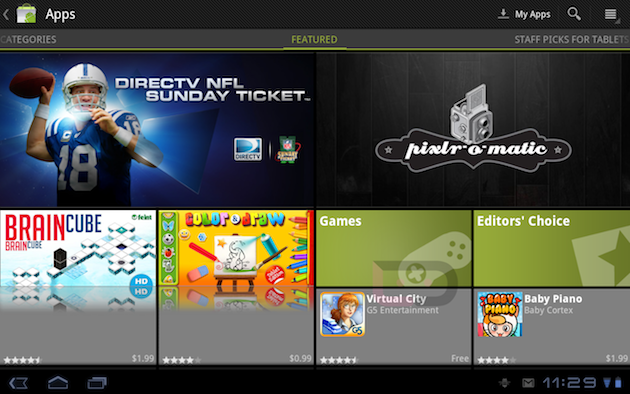
This week the lastest version of the Android Market rolled out to Motorola Xoom user's.  Sounds like this is in preparation for the latest version of Android dubbed the name: 'Ice Cream Sandwhich'.  I don't have a Xoom, but it sounds like the aim of this update is to offer a little better organization to the current version of the Market for tablets.

The update seems to lay things out onscreen in more of a tiled manner, and according to some of the buzz on the web nothing has really changed other than it's appearance.  Check it out:


One thing this does mean is that Ice Cream Sandwhich must be right around the corner.  And if signs are any clue, it is believed that Google will unveil Ice Cream Sandwhich on October 11th.  As we have mentioned before, ICS is supposed to bridge some of the gap between Honeycomb and Android on smartphones.  Which in theory will clear up some of the fragmentation Android user's bump into.

Monday, September 26, 2011

Android Security in a Nutshell

0 comments
A hot topic within the mobile technology world for sometime now has been the topic of malware, virus protection, and security.  If you are an Android user, you've probably seen the anti-virus apps in the Android Market for AVG and Norton (and I think there are a few others as well).  These apps are good and well for some I'm sure.

Personally, I installed the AVG mobile app on Acer Iconia a500 and wasn't impressed with the app at all.  It runs in the background (even though I didn't notice a hit to the performance); I couldn't tell that it was actually doing a proactive job at protecting me anymore than if I were to use a good square head and some common sense.

So, in the spirit of making informed choices based on common sense, here is a short list of things you can do to help make your Android experience a little safer for you and others.

1- Only download from trusted sources.
There are a lot of apps in the Android Market.  And pretty much anyone can make an Android App and get it listed.  Google filters out some of the junk apps over time, but they definitely don't catch everything.  When browsing the Android Market I try to look for apps that are developed by individuals or companies who I am familiar with.  I would rather purchase a game from a company  like GamEvil or Gameloft as opposed to John Doe from Kentucky.  If it looks funny or questionable, it probably is.  If the app listing doesn't have pictures or video of the app in action, I pass it up.  No question. If they can't show it off, I shouldn't waste my time on it.  Simple as that.  Every app has a list of permissions it needs when being ran.  Keep an eye on these, they will help you sniff out whether or not a specific app should be trusted.

2- Leave 'Download from Untrusted Sources' disabled.
If you may be tempted to try an app you found on somebodies website where you download the individual .apk file; you probably need to leave the option to download/install from these sources alone.  By default it is disabled by most devices.  It is easy to get a hold of a bad .apk using this means of installation.

3- Use only trusted App Markets.
There are several Marketplaces out there, beside Google's Android Market.  Aside from the included Google Android Market, I also have Amazon's App Store installed.  For those who aren't familiar with Amazon's offering, their prices are competitive with Google's Android Market.  However, Amazon gives away a paid app for free everyday.  Sometimes the apps are rather simple or dull.  And sometimes they are top notch mobile games.

The only catch to Amazon's App Store, is any app you have installed using the Amazon App Store requires the Amazon App Store to be on the device to launch the app.  Otherwise, it's great.

4- Secure your device.
This can be done by setting a lock screen password or gesture on most Android devices.  After all, security threats don't just linger online.  It can come from you leaving your phone plugged up in the break room at work.  Or if your device gets lost or stolen, there are even apps that allow you to remotely wipe or locate your device.

5- Beware of who you share information with online.
It's true, we are as mobile as we ever were.  And we all still require the same amount of data retention on the go as we do sitting on our couches playing with smartphones.  But this same concept can be used in basic, everyday computing as well.  Always remember what services you use on your device, and make sure that they will never send an email asking for your account credentials  If you receive a request via email or live chat asking for any personal information, it's a good idea to contact the host of those services directly (by physically visiting their site, sending an email yourself to their support, or calling them) to verify the situation.  In most cases, you can even forward the email to the host and let them record the email as spam.

Using these 5 simple concepts will make not only your mobile experience a much safer one, but your everyday computer use will benefit too.  It is true that mobile malware is becoming more of a threat to your Android device, but keep in mind that this malware has to be run by you (the user).  So the front line defense for any device should be the user (you) keeping a clear head on what you are running.

Android App Review: N.O.V.A. 2 for Android Devices

0 comments
If you are have at any point been an iOS fan/gamer you may have either seen or even played one of Gameloft's coolest titles: N.O.V.A.: Near Orbital Vanguard Alliance for the Apple's iDevices.  I actually still play this one on my iPod Touch.  It's that awesome.  So, I was more than thrilled to see that it's sequel: N.O.V.A. 2 has an Android port, and that it runs flawlessly on my Acer Iconia a500 Tablet.

If you were able to get in on their back to school sale, the game was only 99 cents on the Android Market.  It looks like it has gone back up to $6.99 recently.  But even at $6.99, this game is awesome.  The sequel to the much acclaimed N.O.V.A. brings back the on screen controls and outstanding graphics that originally made it such a hit with mobile gamers.

So, for those who don't know...What is it?  N.O.V.A. 2 is a first person shooter for Android and iOS devices.  It is based in a sci-fi world where the story picks up 6 years after the first game.  The game's intro video is amazing for a mobile game.  And the gameplay is just as awesome.  The story throws your character into the middle of a crazy civil war between human colonists and a central government with shady intentions.


In the first few minutes of actual gameplay, you get a crazy action sequence that involves some Halo style features.  The sound is much of what you'd expect from a first person shooter.  So nothing crazy there.  But where this game shines (and I can't say thing enough) is in the graphics department.  The game's visuals are amazing for a mobile device.  I use my tablet for reading, web surfing, and watching the occasional video clip on YouTube.  So to jump from those uses, into a game of this quality is awesome.

The game also includes online play (which I haven't tried yet).  I have the bad habit of playing too much multiplayer and not enough single player modes, that I try to save the multiplayer for later.  My personal preference.  So are there any downsides to the game?

In my opinion, only one.  It's the controls.  Sure, the controls are pulled off via on screen overlays.  But I tend to find myself drifting my thumbs up and down the left and right edges of my tablet.  Making it easy for me to throw my view and aim off in crazy directions.  Especially when the crap hits the fan during fire fights.


What I would like to see accomplished with the controls, is support for controllers and gamepads in Honeycomb 3.2 devices.  Other games have pulled this off (Riptide GP by Vector Unit) so I don't see why Gameloft doesn't grant us that option with N.O.V.A. 2.  That would make an already awesome mobile gaming experience all that more better.

It is obvious that games like Halo seemed to lend some inspiration the the game's developers.  Gameloft is one of those companies who are notorious for publishing games that borrow aspects heavily from other game titles (often people cite Gameloft titles to resemble the art style of games like WoW, GTA, Halo, and some others).

So when it comes right down to it.  What is the verdict on N.O.V.A. 2?  Is it a must buy or a pass?

Verdict:
-Must Buy!
For mobile gamers looking for a great looking and challenging game, check it out. Likewise, fans of First Person Shooters in general shouldn't pass this one up.

Cons:
The cons are pretty limited on this one.  I would like to see controller and gamepad compatibility.  And one issue I have read about (and seems to plague Gameloft's titles in general) is hardware support.  It will either work or it won't be compatible.  I can confirm that is runs great on the Acer Iconia a500 tablet.

Techie's Rating:


Checkout the Android Marketplace to pick this title up:
Gameloft's N.O.V.A. 2http://bit.ly/oRbmQS
Cost: $6.99 USD

Happy Surfing!

Friday, September 16, 2011

Archos Releasing New Tablet Line...To Hit as Early as Sept. 20th

0 comments
In recent tablet news, Archos is planning on rolling out 2 new tablets.  Both are set to hit in September, which as most of you know is now halfway over.  These are part of the Archos G9 tablet line, and will feature both a 10-inch and an 8-inch screen.  For $299 you'll get an 8-inch (Archos 80) sporting 8GB's of flash storage, a 1GHz Cortex A9 processor (yes, it's a dual-core).  And a maximum screen resolution of 1024x768.

And of course the 10-inch big brother to the Archos 80 (named the Archos 101) will sport a USB Port (compatible with a 3G stick to be produced by Archos);  a 1.5Ghz OMAP 4 processor (it's dual-core too), and a maximum screen resolution of 1280x800.  Both models will come with the now defacto standard of tablets: including front facing cameras for videochatting, and WiFi radios for WiFi internet connections.

There will also be a higher end model of both the Archos 80 and 101 that will include 250GB Hard Drives instead of flash storage.  If you are familiar with previous Archos device, they have always had a heavy, thick appearance, but have been solid devices.  One of the common complaints I have heard and read about in the past is that the Google Android Market doesn't have a shortcut on these devices out of the box.

This has been due to Google not certifying the Archos devices due to screen size and some hardware specs (previously Google has required a device to be certified by them to include some Android features such as the Google Android Market by default).  However, there has always been workaround to get the Android Market installed.  Even so, they always included their own App store to provide a way to download apps.  Hopefully, they're able to remedy this with Google, I believe it would only help their sales.

So, if you're in the market for a decent sub-$300 tablet, keep your eyes open.  Archos is planning on hitting online and brick and mortar stores on September 20th (four days from this writing).  And yes, they will be running Honeycomb 3.2.

Tuesday, July 26, 2011

Google Music...What is it?

0 comments
If you're a fan of digital music you have no doubt heard of Google's attempt to become a player in the music sector; Google Music.  How?  By making "cloud storage" available for storing a user's music collection.  That user could then you any Android device running Android 2.2 "Froyo" or higher.

So why would you want to use it?  Simple, if you have a music collection ranging from just a few songs to a huge library of music files, than you know what kind of pain it is to sync up your iPod or music player to make sure you have that music with you.  Personally, I have an iPod Touch that I despise plugging into my computer to sync with iTunes.  iTunes is cumbersome and slow (in my opinion).  With Google Music, simply point the Google Music Manager client to the folder(s) where you store your music locally on your computer and it will scan the directories and start uploading the music it finds to the "cloud".

With the music being stored on a server somewhere in a Google datacenter, you can then use any computer that has internet access, running Windows XP and up, Mac OS X 10.5+, or about any of the popular Linux distro's to then playback your music library.  If you have an Android phone or tablet that is running at least Android 2.2 "Froyo" than you also have access via the Google Music app for playback on those devices.

What are the drawbacks?  First and foremost, pricing.  Google has yet to release a pricing scheme for this service.  With Amazon currently offering a solution that ranges about $25 a year, and Apple is sure to have a solution on the way as well, Google hasn't drawn their line in the digital sand yet.  Secondly, in order to get the music from your computer to their storage servers you have to upload it.  If you have a huge library, this will obviously take some time.  Third, you are restricted to accessing your full library (once uploaded) to area's where you have internet access.  For smartphone user's this isn't such a big deal (you'll have to worry more about your data caps with your mobile provider).  However, for owner's off WiFi only tablets (like myself) I'll only be able to access my library from one of several places I commonly use for WiFi (I've yet to adopt any kind of MiFi access points).

So, if you have an extensive music collection or just a few songs you'd like to access from the office why not take a look at Google Music.  Right now the service is in Beta so it's an invite only basis.

Check it out: Google Music: http://music.google.com

Monday, July 18, 2011

Acer Iconia Tablet a500 Update Woes...Weekend Update

0 comments
Still no news as far as the Honeycomb 3.1 Update goes.  But to be fair, I haven't had a lot of time this weekend to bug Acer Support about my update woes.  I'll be hot on the trail again on Monday afternoon, so more to come!