Showing posts with label smartphone. Show all posts

Friday, March 1, 2013

National Day of Unplugging

0 comments
National Day of Unplugging
Did you hear?  That this evening from sunset until tomorrow (March 2nd), a nonprofit group named "Reboot" has suggested we have a "National Day of Unplugging".  The goal is to encourage people put disconnect for technology for the close to a 24 hour period.  In attempt to battle "burnout" and stress that comes from being wired into technology all the time (like most of us are).

I see a couple things about the "National Day of Unplugging".  First: is it kind of funny that a large portion of the time spent "unplugged" will occur at night while a lot of us sleep?  Or it it because a lot of recreational technology use is done of the evenings after we all get home from work?

Second, isn't it kind of funny that instead of starting say March 1st at 8:00a let's unplug.  Instead, it's the idea of getting through the business day and then unplugging.

My skepticism aside,  I completely understand that with the advent of things such as our laptops, tablets, and smartphones we all are hooked up way more than we probably should.  And yes, I am positive that I understand that with these technological attachments comes the added stress from always being "in the know" whether it be for personal or work use.

But for me, one day of being unplugged just isn't enough.  For me personally, I try to leave my phone in the other room on occasion.  Or go out to eat and leave the smartphone at home.  In reality, we will not be gone that long and the phone can wait.  With all of that being said, I doubt I'll be participating this evening and tomorrow (as these times are my usual gaming times and that requires being hook into tech).

But for those who wish to participate, I highly commend you.  Just don't over do it when you pick up your phone tomorrow evening.

For more on the "National Day of Unplugging" visit: http://www.rebooters.net/

App of The Week: Shadowgun Deadzone

0 comments
Shadowgun: Deadzone for iOS & Android
Our App of the Week for the week of March 1nd, 2013 is: Shadowgun: Deadzone.  As always, we always try to highlight apps that are cheap and/or free in most cases.  There are exceptions where an app is just so awesome, that paying more than $4 or $5 dollars shouldn't be a problem.  But keeping true to our idea that most of us are on a budget (and or just cheapskates like me), ShadowGun: Deadzone is a FREE app.  And unlike our usual App of Week pick, this game is cross platform on both iOS device and Android devices.  So let's jump into what really makes this game standout.

What is it?

Shadowgun: Deadzone is an online multiplayer, third person shooter title.  It follows the release of the original Shadowgun game for iOS and Android created by MadFinger Games.  This game is absolutely gorgeous.

The Story

As mentioned above, Shadowgun: Deadzone is an online multiplayer game that throws the player into either a deathmatch style game or a capture point style game.  There is very little by way of story for this app.  It ideally picks up after the events of the original Shadowgun title.  If you missed the original, a "Shadowgun" is basically a professional bounty hunter.  In the original game, you played as John Slade and your mission was to stop a mad scientist from making a mutated army.  So in Deadzone, your character is either a mutant soldier or one of several Shadowgun skins.

Gameplay

The game plays pretty much just like the original Shadowgun title.  It is basically a covered based shooter much like the Gears of War franchise on the Xbox 360.  Meaning, you run and gun and use objects that are scattered around the map to hide behind when you need to get out of the line of fire.  When hiding behind a barrier or your back is pressed against a corner wall, the camera shifts a little providing a view of the action in front of you.  You can then fire from behind cover, which is really handy in a heavy firefight.
Shadowgun: Deadzone

The controls are fairly straight forward as well.  On the left side of the screen is a virtual joystick which controls movement.  You aim by sliding your right thumb around the screen.  In the bottom right we have several icons that include aiming/firing, reloading, and sprinting.  In the upper right corner of the screen we have your weapon selection icon, your sprinting meter, and a couple empty inventory spots for certain perks or power ups that you unlock as you play.  These perks can include the ability to drop ammo or health recharge packs, use motion radars, and grenades to name just a few.  Unlike a lot of games that utilize a touch based, onscreen button layout; this one works extremely well with a very low learning curve.

Other Features

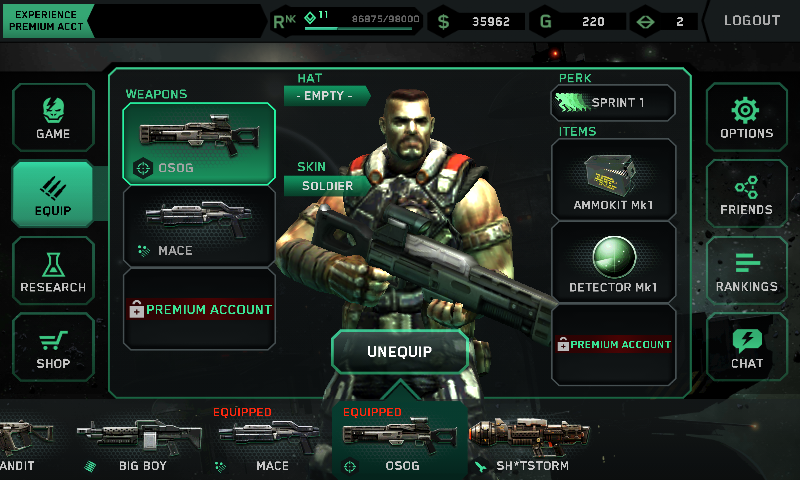
What would a game that only offers online multiplayer be without a system for leveling your character?  And Shadowgun: Deadzone offers exactly that.  As you play matches you gain experience points and cash.  Both of these add up over time.  Your cash is used to upgrade weapons and unlock new power up.  Meanwhile, you're experience points builds up your character's level as you play as well.  Here is the important thing, a higher level doesn't necessarily mean a "stronger" character.  It does mean, that someone with a higher level than you, has access to different weapons which in turn may be stronger than those who run lower level characters.  But this is a fair trade off.  As I have been in matches with people who are much higher levels, and still been able to more than hold my own against them.
Shadowgun: Deadzone
Character Loadout Screen

There is also a "Casino" feature built into the games main menu.  Each day your account will be given a token (or 2 or 3 depending) and you can use these tokens to take a spin on the Slot Machine.  The reward for playing the Slot Machine is in game gold.  This gold can be used to buy cosmetic items such as skins, hats, etc. for your character.  As the tokens are given to your account, you do not have to pay "real-world" money for these.

There is also a buddy list, you can log in with your Facebook account, and you can chat (and voicechat if you have a premium account).

Game Modes

Shadowgun: Deadzone

Currently there are only two game modes: Deathmatch and Zone Control.  Deathmatch is your traditional free-for-all game mode.  Where every player loads out into the map and spends the matches time limit trying to frag each other.  He who has the highest killscore wins the match.  Meanwhile, Zone Control is a little more tactical.  Each map is contains a series of "Control Points" which also acts as spawn points.  Two teams (red and blue) each fight for the duration of the match to gain control of more points than the other team.  Eventually this leads to some pretty epic battles over points in the middle of a map.  I spend a lot of time playing Zone Control as the strategy aspect of this game mode is a lot of fun.

Premium Features?

So at this point you may be saying, "Wait a minute? A game with these features, and it's free?".  That's right, it is free to download and free to play.  There are a couple ad screens you will see while playing, but the ads are for Shadowgun: Deadzone itself.  Players have the option to upgrade to a "Premium Account" if they choose.

Premium accounts get the following:
-50% more Money and Gold for Playing Matches
-Increased Experience Points for Matches Played
-Access to Premium Servers
-Voice Chat

Premium features can be purchased using your in-game gold or you can drop some "real-world" money for it as a microtransaction.  Premium accounts can be:
-1 day 
-3 days ($00.99)
-1 week ($00.99 USD)
-1 month ($2.99 USD)
-3 months ($9.99 USD)

For example, I ran the month of January as a premium account.  And the immediate advantage is being able to change between more than just the original 2 character skins.  For me the cost is very little and if it counts towards helping the developers build updates for the game; then I am happy to support it.  The Premium cost is a one time charge and no recurring.  So when it runs out, you are dropped back down to a "Free Play" account status.  Which means you receive less money and experience points.


Overall

This game should be considered a AAA title.  It offers gameplay that I have yet to find in any other mobile game.  And it feels like a big-console experience that you can hold in your hand.  With great controls and graphics and an online experience like no other on a mobile device.  I highly recommend this game.  With a limited selection of maps and only two game modes, I would love to see this game grow to offer more as time goes on.  But even with those limitations, I still give this game 5 Stars.

To play it, you will need a device that has at least 512MB of RAM.  For iOS device users this includes: iPhone 4 (and newer), iPod Touch 5th Generation, and iPad 2 (and newer).  For Android users a modern device with at least 512MB of RAM and running Android Honeycomb and newer.
I have been playing this on both my Samsung Galaxy S2 and my Google Nexus 7 and it plays smooth and fluidly on both devices.

Check it out:

Friday, February 3, 2012

Android App Review: AirDroid

0 comments
After what feels like a really long time, we are back in the saddle again with a app review for an awesome little Android app that just happens to also be free!  It's named: AirDroid.  Basically, the concept behind AirDroid is simple.  It allows you to access the contents of your Android phone via a Wifi internet conncection just as if the phone was directly connected to the computer via a USB Cable.


This is accomplished by using a pretty slick looking web interface.  Essentially here are the steps to using AirDroid.
1- Turn on your phone's Wifi Connection and connect to your router.
2- Launch the AirDroid app on your phone or tablet.
3- Press the blue 'Start' button.
4- Enter the IP Address in your computer's web browser address bar.
5- At the Web Login Screen type in the password given to you from the app.
6- Your in!

Once inside the AirDroid web interface, you can launch various file manager type dialog boxes to move files to your computer from the phone or vice-versa.  If you need to backup anything like your music, pictures, and even apps; all this can be done quickly and easily.  In my example, I was able to backup all of my pictures to my Desktop computer in the form of a .ZIP file for extraction later.  And it took a couple of seconds to get it done.

The price of AirDroid is great considering it is free.  But even if the devs decided to start charging for it, I'd happily pay a couple of dollars for this type of app.

Be sure to watch the video for the full review:


As always, be sure to swing by our YouTube Channel and subscribe to stay updated when new videos go live!
http://www.youtube.com/techiesmarts

You can also follow me on Twitter as well!
http://www.twitter.com/techiesmarts

Monday, November 28, 2011

Review: Samsung Galaxy S2 Epic 4G Touch

0 comments
Samsung Galaxy S2 Epic 4G Touch
A couple of weeks ago I managed to get my hands on a Samsung Galaxy S2.  And in short, it has to be one of my favorite devices yet.  I'm using the Sprint model which is dubbed the 'Epic 4G Touch' surname.  I have had my hands all over this phone for the past 2 weeks and it continues to get more and more awesome all the time.


Let's cover some of the phone's specs right quick:
- Dual-Core 1.2GHz processor
- 4.52" Super AMOLED Plus screen
- 8 MP rear camera and a 2 MP front facing camera
- Voice Talk by Vlingo
- Expandable Storage up to 32GB via MicroSD card
- 16GB of onoard storage
- Mobile Hotspot Feature
- 3G/4G compatible where speeds are available
- WiFi built-in

So you can see from the specs that this phone packs some serious punch under the hood.  But how does it perform?  In a nutshell, smooth as can be.  I have experienced very little to no lag from this device.  And lag is one thing I have noticed in both my Acer Iconia a500 Honeycomb Tablet and my wife's HTC Evo 4G.  Usually the lag on those devices occurs between screen transitions from Applications Menu to Home Screen or when loading up a resource heavy game.  But none of that has been evident thus far in my Galaxy S2.

Samsung packs this phone with the TouchWiz UI overtop Android 2.3.4 (Gingerbread) by default.  This means we get some pretty useful shortcuts and a nice, clean looking User Interface.  Some of the shortcuts are pretty awesome too.  The one I especially like (since I shuffle app shortcuts all over the place) is the tilt to move feature.  Simply tap and hold an app shortcut and tilt your phone to cycle through the available home screens.  It works flawlessly.  If you're not a widget fan, you'll have some work to do since by default there are numerous widgets running onscreen from the first power on.

Namely, you will see the clock and weather widget on the main home screen.  If you scroll to the left one screen you will see a Driving/Handsfree Widget and and a nice looking AP News widget.  If you scroll to the right one screen from the Home Screen you will have the Google Search Widget.  This being the Spring version of the phone it does come with some bloatware from Sprint.  In the form of: Spring TV, Sprint Zone, Nascar, Sprint Radio, etc.

The phone does come with a cool app named Kies Air.  In short it lets you control the phone's contents from a computer's web browser (as long as your computer and phone are on the same WiFi network.  The layout is nice and allows you to see pretty much everything you have on your phone from pictures to the most recent text messages all within your web browser.  That being said, I could play music back but had issues copying files through the network from the PC to the Phone.  Maybe I was doing something wrong.  Still, not a deal breaker for me as I could care less about this feature overall.

The default social networking app is 'SocialHub'.  I had some issues with SocialHub (just being in the form of having to track down settings and options from where I felt they should logically be placed).  Still, not a big deal as I ditched SocialHub for the Plume and Facebook apps for Android anyways.  Another great app that comes loaded on the phone is Polaris Office. And it appears to be the full version of the app as well which includes Windows format compatibility.  So that is a nice inclusion as well.

TouchWiz HomescreenOne of the big topics that is discussed with every Android device is battery life.  And most of the time this is one of the biggest complaints from Android user's.  I can honestly say that my battery life with the Galaxy S2 is pretty good.  In short, carrying it around during the day (from an 8 to 5 workday) my phone doesn't outright die halfway through the day.  Usually when I get home in the evenings around 5:00p or so it is down to about 40% life left.  Which is pretty good in my opinion.  Especially when my wife's HTC Evo 4G tends to get something like 4.5 to 5 hours of life from a full charge.

With that being said, I'm also running it with 4G turned off (we have no 4G in my area yet) and the WiFi and Bluetooth radios turned off as well.  Surfing the web on WiFi around the house causes the battery to discharge much faster.  But still it is fine for casual use or updating a Facebook status.

The camera is outstanding and does a great job.  In low-light areas the pictures still look as long as the flash is turned on.  And the flash is freakin' bright too.  So, if you're into mobile photography with your smartphone you'll not be disappointed.

One last thing to touch on is the hands-free features.  The hands-free/voice recognition features are powered by Vlingo.  Vlingo has been around for a while and can be thought of as an app similar to Apple's Siri in functionality.  And it is pretty good.  Out of the box you can have it read your text messages and send text messages for you.  It can do web searches and pull up GPS info for you as well.  All powered from your voice.  If using a Bluetooth headset it is setup so if you say: "Galaxy Hi" it will wake the phone and allow your voice input to use the phone.  Pretty awesome.

I had only one issue with the phone, and it was more with the software and with Facebook than with the device itself.  If you sign in to Facebook for Android, you're contact list will compile all of your Facebook friends info into your Contacts List.  I didn't like this feature and quickly found an easy way to turn it off in the settings.  Once again, it was an easy fix and not that big of a deal.

I could go on and on all afternoon about how awesome this device is.  I mean, I essentially replaced my iPod Touch with this device because it everything my iTouch did in terms of music and podcasts, not to mention Netflix and Crackle run great on it.  And gaming is jaw dropping on this device.  If you are looking for a great Android phone, without a doubt I would highly recommend the Samsung Galaxy S2.  The great thing about this device is that Sprint, AT&T, and T-Mobile all have their own version of the Galaxy S2.  So if you're on one of these services you can have a go at the S2 yourself (sorry Verizon customers).

Easily this phone gets a 5 star/5 star score!

Tuesday, October 4, 2011

Apple to World: No iPhone 5 for you!

0 comments
So this morning was the big Apple announcement...What was it?  Was it worth all of the hype?  The big guess from just about everybody in the world was that Apple would be announcing the iPhone 5 (or at least iOS 5).  As the world eagerly awaited the freshly appointed CEO Tim Cook to take the stage and show the world the next version of the iDevices...

But that's not what happened.  Instead, it was announced that Sprint will start carrying iPhones and they will be the iPhone 4S.  And you can preorder your's on Friday.  Meanwhile, they will go on sale on October 14th.  So what makes the iPhone 4S newsworthy?  I mean, since it's obviously not an iPhone 5 or anything, right?

Well, the device will sport faster processing and downloads, and the camera gets a big bump.  It will jump from a 4 megapixel camera to an 8 megapixel camera.  And they now include an app called Siri for voice assisted features which also seems to tie into some web services like Yelp!.

On the iOS topic, they did announce that iOS 5 will become available on October 12th.

Personally, I don't see it's that big of a deal.  It seems like the whole event was over hyped.  I mean, are we really that surprised when another carrier picks up iPhone support?  Personally, my wife's HTC Evo 4G has a plenty fast enough processor and already sports an 8 megapixel camera.  So no real reason to jump ship to the iPhone camp here.

What do you think?  Is it worth your time to jump over to Sprint or even bother with an iPhone 4S?  Leave a comment about it below!

Monday, July 18, 2011

Feeling Jilted over NetFlix? There are other choices out there...

0 comments
I have no problem letting it be known that I was more than a little torqued off about the 60 percent Netflix price hike.  Personally, I have been a NetFlix subscriber for quite some time now.  We only occasionally would rent a physical DVD, and between my wife and I; I was the primary user for the NetFlix streaming through my Wii and PS3 (occasionally through the iPad).  The previous pricing for their subscriptions was nice.  Basically, streaming account with one DVD rental at a time via snail mail for $2 extra.  Bringing it to a $10 cost each month.

Even though we didn't use it that much, it was nice to have when you do want to waste a Saturday afternoon.  Therefore, for the extra $2 bucks a month it wasn't worth my trouble to change my account to a streaming only setup.  However, now that the price has basically rocketed up from $10 to $16 ($15.98 to be spot on).  I'm re-evaluating our options.  So, I figured I'd make my thoughts public in this post.  This is me 'think out loud' about our current streaming/DVD options.

For DVD Rentals:
RedBox is a pretty prominent offering here in my area.  It's nice because you can reserve and hold movies for pickup. And their kiosks are everywhere in this area.  So going out of the way to return a DVD isn't a problem, and I have a couple kiosks closer that the post office is (where I'd normally return my NetFlix DVD's).

If RedBox doesn't have what we are looking for, there is a really good video store about 5 minutes from the house.  Their selection is huge, and they are one of 2 or 3 rental stores still left in our county.  They have movies ranging from the newest stuff to really old (and even some VHS for VCR lovers out there).

And the chances of us adapting to this method for DVD/BluRay rentals is a nonexistent problem, because we have been using these two sources all along.  So we'll continue doing this.

For Streaming:
This is where it gets a little messy.  I like to stream video from the web.  It's just simple to do it.  Find a good site with a nice offering of shows to stream and I'll have a blast.  At least until I watch most of their catalog that strikes my interest or until they quite updating it.  Currently, my streaming options include Crackle.com, Hulu.com, and OVG Guide for searching for shows to stream.

These are all nice offerings, but Crackle is very limited.  And Hulu has a good selection, but I'm not sure if it's worth the $8 a month for a Hulu Plus account.  I liked the fact that with NetFlix Streaming I could watch all of the old Doctor Who episodes.  And I've yet to find a different source for those.  But not a deal breaker for me.

My wife has a smartphone, and I have an iPod Touch, access to an iPad, a PS3, and my android tablet.  Which supposedly all have access to Hulu Plus except for my android tablet (as of this writing).  And I know my wife would use it to watch more current shows than she could find on NetFlix streaming.

I know there are other options, but I may ended up rolling through the free week trial of HuluPlus and seeing what they have to offer as far as selection goes.  Watching ads isn't a big deal to me, especially since I won't be living and breathing on their website all the time.  My other options include: video rental on my Xbox 360 and PS3.  I'm not a big fan of how Apple has setup their Apple TV offerings, so I'll be staying away from that option as well.

Other alternatives if you're shopping around too:
Green Cine: a mail order service much like the NetFlix DVD service starting at $9.99 a month.  I don't know much else about this service.  But here you go. http://www.greencine.com/main

Mspot Movies: they work off of a club or credit style service.  And you can rent digital movies starting at $1.99 and going up to about $4 to $5.  Not bad for the occasional rental, but could get pretty costly with prolonged use.  They do have a Rental Club you can join as well. http://www.mspotmovies.com/

And of source Blockbuster has a mail order style service and some On Demand stuff, as well. 1 Disk at a time will cost you $9.99 a month and 2 at a time will set you back $14.99 a month.

And Amazon has an offering now as well that is pretty limited but is likely to grow: http://www.amazon.com/gp/prime which is $79 a year.

So if you know of any other legitimate sites that can act as a NetFlix replacement, drop us a line in the comments section and let us know!

Thursday, March 31, 2011

Tidbits: Battery Lifesavers, The Governator, and a New Resident Evil Game?

0 comments
This morning I stumbled upon a pretty good article about the HTC Thunderbolt Android based phone.  Do I have a Thunderbolt?  No, am I getting one?  No.  But my wife uses the HTC Evo, and as of late she has really been complaining about her battery life.  I found she had turned her screen brightness all the way up.  Which of course, was the kiss of death for her battery life (plus she lives on the phone causing even shorter battery life).  So, I forwarded her the link to this article and figured why not post the link here as well.  So if you have an Android based smartphone give this a quick read:
http://www.zdnet.com/blog/btl/five-battery-life-savers-for-htc-thunderbolt-and-other-androids/46747

On another note, Mr. Arnold Schwarzenegger has a new role.  Teamed with Stan Lee, he is now "The Governator".  That's right.  He has been transformed from action star, to politician, and now the only sensible thing for him to become is a superhero.  The stort takes place after Arnold leaves political office, he becomes a superhero to fight crime.  It will be semi-fictional; using details from his real life to establish the character.  Look for it in your comic book store next year.
http://www.tvguide.com/News/Arnold-Schwarzenegger-Comic-1031268.aspx

Lastly, guess what...Another Resident Evil game is making it's way to gamer's consoles.  The new title is called "Resident Evil: Operation Raccoon City".  Not much is known about the title other than it is a co-op shooter and player's now take on the role of Umbrella Security Services instead of the B.S.A.A. or the original S.T.A.R.S. teams.  Honestly, I loved the original Resident Evil titles.  For me the series started losing ground later in it's life.  But this could honestly be a neat experience.
For more details on the game, head over to: http://stickskills.com/news/1556/first-details-on-resident-evil-operation-raccoon-city-unveiled/

And for a look at the teaser trailer, see below:


Happy Surfing!