Showing posts with label honeycomb. Show all posts

Wednesday, November 2, 2011

Backup Your Android Apps Using Astro

0 comments
Astro File Manager for Android
Last week my wife managed to assassinate her HTC Evo 4G Android based smartphone.  She uses her phone more than her laptop these days, so she has a lot of data she wanted to move over to the insurance replacement we got her.  Not a big deal since pretty much everything she wanted was already stored on her external SD card.

Where I ran into a problem was when she asked the dreaded question: "Can I transfer my apps from one Evo to another?".  Short of finding a way to relocate apps to her external SD card to be moved, I had no clue how to do this.  We haven't had to cross this bridge before.  She looked through her apps on the old Evo and decided there wasn't anything there she couldn't re-download manually and all of her apps are freebies from the Android Market.  So she decided to handle it that way.  But this got me thinking (and researching) is there a way to backup all of your apps on your Android device to easily reinstall on another Android device at a later time.

And with Astro File Manager, the answer is yes!  Astro File Manager is free from the Android Market (it is ad supported).  Once you have it downloaded, simply tap the the Astro Icon to launch it.  And you will be greeted with the main screen.  Now tap the button marked 'App Backup' (see pic below).
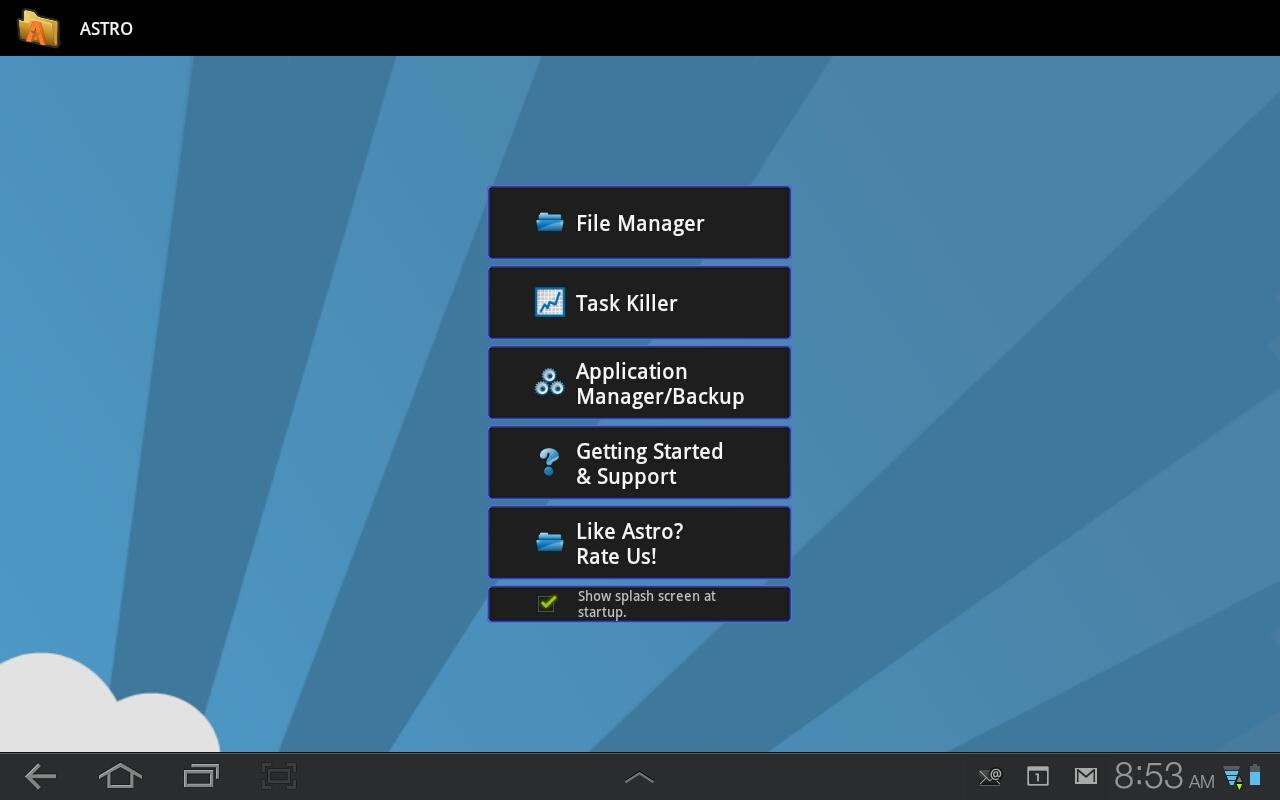
 Step 1- Tap the 'Application Manager/Backup' button.

Then you will be taken to a screen with a list of all of your installed apps.  On my Acer Iconia a500 it also lists apps that came with the device (I'm using the stock ROM and it's not rooted).  Simply scroll through the list and pick the apps you'd like to have backed up by taping the check box to the right of their list entry.  Or you can select the entire library of apps by tapping the top most check button (it's a Select All).

When you're done, simply tap the blue 'Backup' button at the top of the screen and it will proceed with the backup process.  Once it's complete you can navigate to the backup folder to verify it did infact backup what you wanted.  Last night I backed up 54 apps and there was a folder created with all 54 apps stored inside.  (It actually stores the APK files so you can reinstall them from this backup).

Here is where I bumped into a little trouble.  Everything I seemed to find online referred to the backup folder being automatically stored to the external SD card by default.  On my Acer Iconia a500 this is not the case.  It actually stored the folder on the 'SD storage' partition/directory where pretty much all of the other app data is stored.  Using Astro I navigated to the backup folder and copied it and then navigated to the 'External SD Storage'.  Astro refers to the device's native storage as 'Internal Memory'.  See the picture below.

Copy the 'backup' folder from the 'Internal Memory' folder to 'External SD Card'

Once the copy is finished I went back to the 'Internal Memory' folder and deleted the subfolder named 'apps' in the 'backup' folder to save space on my device.  Restoring apps was extremely easy as well.  Simply select the 'Application Manager/Backup' button from Astro's main screen and select the tab 'Restore Apps'.  And point Astro to the folder where your app backups are stored.

Now that we know how, it will be as simple as installing Astro File Manager on both Android devices (one to backup from the old device and the other to restore from the backup to the new device).  Astro is also a great file manager which can be extended through Market downloads granting things like Bluetooth Access and access to Windows and Samba servers as well.  The free version if ad supported but you can also purchase the Pro version which is ad free.

If you use another backup app be sure to let us know by leaving a comment!

And if you need to get your hands on Astro File Manager, swing by the Android Market at:
Astro File Manager by Metago on the Android Market

Saturday, October 15, 2011

Motorola Targets Families With Xoom Tablet

0 comments
Motorola announced yesterday that they will be selling a Xoom tablet that will be geared towards families.  It will go on sale starting Sunday and will be exclusive to Best Buy.  It will retail for $379 and is basically the same hardware that the Xoom has been sporting all along with one exception.  It will only be available in a 16GB model (instead of 32GB's).  Motorola also said the tablet will come preloaded with some family friendly apps as well.  Apparently, this isn't an ongoing offer as the announcement also points out that this will be a limited time offer.

It's no surprise that Motorola is doing this.  With the release of the Kindle Fire, most of the tablet manufacturers have been forced to play their hand at price cutting to keep their products as relevant as possible in the sea of cheaper tablets.  Hopefully, this will help Motorola's position in the tablet market.  The Motorola Xoom was the first Honeycomb tablet on the market and was awesome.  However, it didn't take long for competitors to overshadow the Xoom with other offerings.

Thursday, July 28, 2011

ASUS Transformer Getting Honeycomb 3.2...Today?!

0 comments
Actually I guess owner's of the supported ASUS Transformer tablet will be getting the Honeycomb 3.2 update rolled out today (7-28-11).  This is great news for proud Transformer owners.  It was released a few weeks ago that Honeycomb 3.2 was being tested by Motorola and ASUS for the tablets: the Xoom and Transformer (respectively).

Meanwhile, those of us proud owners of the Iconia a500 (made by the other company whose name starts with the letter 'A'; just received the Honeycomb 3.1 update.  And from what I've beem seeing and reading a lot of the Iconia a500 owners are still awaiting the update for 3.1.  At this rate we'll probably see 3.2 on our Iconia a500's by October and maybe the release of Ice Cream by the end of the year (if this rate of updating continues).

On another note, apparently Honeycomb 3.2 is rumored to bring Netflix streaming support to the Transformer tablet.  Maybe one day fellow Iconia users.

Friday, June 10, 2011

Android review: 'Riptide GP' by Vector Unit

0 comments
Today I'll give a brief review of Riptide GP by Vector Unit.  Riptide GP is specifically for Tegra 2 Android devices, which is unfortunate for non Tegra 2 users.  I'm running this on my Acer Iconia a500 tablet and it rocks.  The graphics are unbelievable for a mobile device.  The water has amazing water physics and real-time reflections; which make for a gorgeous experience.

The game is on the Android Market listed at $6.99 and is worth every penny.  For $6.99 what do you get:
-12 raceways/tracks
-6 jet skis
-Race, Hot Lap, and Championship modes
-Includes OpenFeint support for online scores and achievements.

I played for awhile last night and was blown away.  The controls a pretty simple, you steer your racer/jet ski by tilting the device in either left and right directions.  Once you go airborne swipe your thumbs in each corner to pull of trick moves.  These moves usually require some big air to give you time to land them before crashing.  Swiping your thumbs in different directions make your racer do different tricks, so don't be affraid to experiment with different combinations.

I cleared the first race class last night and felt that every track gives you something unique.  Some tracks are longer and provide bigger jumps than others.  It does kind of feel like they tried to stretch the existing tracks a little far, because once you clear the first few tracks the remaining tracks in that class are simply the first tracks with their layout reversed.  Which at times actually allows for some pretty impressive stunts.  If you have ever played any of the Hydro Thunder or Wave Race (N64) games, this is a similar experience.

In terms of gameplay and graphics I was blown away.  The game is smooth and a blast to play.  There is a free demo version in the market so I'd recommend trying it out first to see if you like it.  It limits you to one jet ski and the first track.  I tried it and immediately purchased it after clearing the first track a couple of times.  In my opinion this is one of the best looking games (if not THE best looking game on the Android Market).

If you'd like to check it out swing by the Android Market:
Full Game $6.99   https://market.android.com/details?id=com.vectorunit.blue
Demo                      https://market.android.com/details?id=com.vectorunit.bluedemo


Checkout the demo video from the Vector Unit site:


*Vector Unit owns all Riptide GP properties. This is just a game review.

Tuesday, June 7, 2011

Android Review: 'Cordy' by SilverTreeMedia

0 comments
As promised this is the first of hopefully many Android reviews.  Today we are looking at 'Cordy' by SilverTreeMedia.  I first played this game at  our local Best Buy a few months ago.  It was loaded onto the Xoom that was on demo in the store.  Immediately, I wanted this game.  I recently picked up a Acer Iconia a500 tablet running Honeycomb, and this was the first game I downloaded.

It is free from the Google Android Market.  After downloading you can enjoy the first 4 levels for free. Once you hit the 4th level you'll be prompted to buy the rest of the levels from within the game.  It is only a few dollars (somewhere around $3 or $4 dollars).  But it is money well spent.

'Cordy' is an extremely well put together game.  I found it fun to replay levels; unlike many platformer games where you feel kind of forced to replay a previous level.  I didn't experience that with this game.  It was just as fun to run through a previous level as it was to discover a new one.  The game is built on the Unity game engine, and can run on Android devices with at least the following hardware:
-Android 2.2 (Froyo)
-ARMv7 CPU
-OpenGL ES 2.0


If you're device is rocking at least the above specs you are good to go.  


The graphics are simply amazing, especially when you consider it is running on a mobile device.  As mentioned above I run this game on my Acer Iconia a500 tablet and it runs perfect.  My wife runs it on her HTC Evo 4G and it runs well.  Very well infact.  The only issue I've noticed when running it on the Evo is a slight lag which can catch you at a bad time when playing (usually when running around a corner when the whole game world has to rotate).  Otherwise, it's great.


The controls are simple and for the most part they stay out of the way.  On the Evo it feels a little more cramped, mostly due to the screen size.  On the tablet, the buttons are large, but they aren't in the way while you're playing.  You basically have one button to run left, and one button to run to the right.  On the right side of the screen you have a jump button and an action button that allows you to charge up the exit hubs, swing, or grab depending on what the situation demands.  Meanwhile, you'll run around the level collecting glowing orbs and gears.  Once you collect enough of the glowing orbs to build up your battery meter, you can plug Cordy into an exit hub which will charge it up and activate the exit door.  Then you can run to the next level.  In later levels you actually get to swing around objects and even jump onto a springboard that will launch Cordy into the foreground or background to continue his adventure.


'Cordy' is a platformer/puzzler game at it's heart.  All the while it dresses itself up with beautiful graphics and snappy gameplay.  As you play you also unlock hats for Cordy to wear during his adventure.  This game is a blast to play and doesn't cost a dime (at least for the first 4 levels).  If you are a fan of simple, but fun games than 'Cordy' is a must have.  'Cordy' has been named as one of the 'Best Games on Android Market' and has been picked as an Editor's Choice title from the market as well.


Checkout the promo video from SilverTree Media's Youtube channel.
And a Link to Cordy in the Android Marketplace.


*Cordy and all respective properties therein are owned by SilverTree Media.


Tuesday, May 24, 2011

Got my Android Tablet!

0 comments
Well, this past Thursday I finally bought an Android Tablet.  I chose the Acer Iconia A500.  Best Buy currently carries the A500 for $449.99 U.S.  It rocks the Android 3.0 'Honeycomb' out of the box.  And let me say, it is pretty freakin' sweet.

This isn't a comprehensive review by any means, but I'll quickly hit the highlights.  This tablet is sporting a NVIDIA Tegra 2 Dual Core mobile processor and 1GB DDR2 memory.  The A500 is a wifi only tablet, so no need to add it to your mobile carrier's data plan.  With public wifi being so readily available these days here in my area I don't have much of a need for a 3G connection at this time (this is subject to change).  This device also offers Bluetooth, A-GPS, 802.11 b/g/n WLAN, HDMI, Dual Speakers (with Dolby), MicroSD card slot, 16GB of internal storage, front facing and rear facing cameras.

The unit is slick to use and very impressive.  A lot of people have mentioned on other sites that this tablet is pretty heavy.  Personally, I don't have a bit of an issue with it's weight.  I had noticed that the battery life seemed to dwindle down fairly quickly.  After doing a little snooping around the devices settings menu I found the 'Battery Use' sub-menu which pointed to the 'Cell Standby' process as using a lot of my expended battery power.  After a few minutes of snooping around forums online, I found the simplest fix that has worked for me (without downloading an app from the Google Market).

I simply put the device in 'Airplane' mode and leave it in airplane mode while then activating the Wifi connection.  Wifi will stay turned on and the device will remain in airplane mode as well.  After doing this I have noticed a huge difference in battery life for the better.

The only other issue I have is voice chat is pretty limited at this time.  My wife has an HTC Evo 4G and occasionally  we'll use something like Yahoo IM to do a video chat from my PC to her Evo.  Which works great.  Right now due to limitations on the Evo (running Froyo) Google Talk's videochat is non-existant.  Supposedly the Evo is in line a the update for Gingerbread later in June which should alleviate this issue.  Honeycomb optimized apps are at a premium right now due to the fact that there just aren't that many apps optimized for Honeycomb.  However, most of the other apps I have tried have worked flawlessly.

Now that I am getting pretty familiar with Honeycomb, look for a few reviews to show up pretty soon.  Right now I am playing through Cordy, and have several other games in mind too.  So check back soon.

Monday, May 16, 2011

Coming Soon?

0 comments
Life has been fairly busy over the last few weeks.  Between work and being on vacation (away from any and all internet connections, yes I survived) my blog hasn't been very accessible.  So what's ahead for the TechieSmarts Blog?

One of the things I'm hoping to do in the near future is be able to bring a full review of Android Honeycomb.  I'm aiming to get my hands on one of the very nice Honeycomb tablets.  More than likely it'll be the Acer Iconia Tab (unless ASUS spits out a few Transformer tablets and they happen to land in my town, chances are unlikely).

With the access to Honeycomb I'll be able to review Android apps as well (most apps apparently run under Honeycomb) so I'll be able to cater to the Android crowd along with the iDevice crowd as well.

I'm looking forward to making blog posts and videos for this site using solely the Honeycomb tablet (I accomplished this on the iPod Touch and the iPad already).  I'll chronicle this adventure as it happens.

Along with mobile apps and capabilities, I plan on reviewing both 'Global Agenda' and 'Lord of The Rings Online' in the near future.  Especially since both of these titles now have Free2Play offerings, if you've been looking into getting in an online game this is a good time to do so.

Overall it's a fantastic time to be a tech freak and gadget fan.  Holding true to my gaming roots look for more reviews from the mobile genre to be coming soon.  So, sit back and relax and drop by soon for some fresh new content.

Happy surfing!

Thursday, March 31, 2011

Tablets, iPads, and other Manufacturers...Oh My!

0 comments
Looks like the old motto: "If you can't beat 'em, join 'em", isn't one that Dell & HP exec's are even considering.  Instead, they decided to go the "All-American" route and start smack talking.  That's right.  We all know that Apple has been pretty much dominating the tablet corner of the technology market ever since the iPad was released.  Myself, not such a huge fan of how Apple keeps their gadgets locked down.  I like having the freedom to do what I want with my tech.  With that said, is iOS bad?  Nope, it's a pretty good system for a mobile device (all Apple based restrictions aside).  And it is very simple for people to use; people who may very well shun other forms of technology.

So, with the recent release of the iPad 2 by Apple; we are starting to see the feathers on their competition start to rise a little.  No doubt other manufacturers are starting to take notice that they are quickly losing ground in the tablet industry.  Recently, HP's Senoir VP of America's Solution Partners spoke out for his distaste in how Apple handles their business relationships with their partners.  Going on the record to say "Apple's relationship with partners is transaction, completely" and carrying on to say "Unlike Apple, HP is a very friendly channel" in an interview with CRN.  The point of his interview eventually leads up to his concern for their new line of tablets that will be touting the webOS.  Personally, I feel he should be very concerned about the upcoming system.  Reason being, if you follow technology you may have heard of webOS.  The system was developed by Palm (the makers of the once famous PDA brand); and was used in their debut phone: Palm Pre.

The Pre was a good phone, and the software got great reviews.  Much like Android it is running on a Linux kernal.  However, it seemed that the Pre couldn't stand it's ground against the iPhone.  Eventually Palm was facing a dire future, and HP acquired the company.  Now they are using the webOS for their mobile devices. And how many advertisements do you see on the web or tv for webOS?  Not many, if any.  I know their tablet line hasn't released yet.  But the PR departments are going to have to start feeding the public some pictures and footage of how this works within their products and start building fanfare.  Without that, I'm affraid a lot of people will set webOS on the backburner.  That would be bad.

Why?  Easy, another company competing in the tablet market will create even more competition.  Competition is good for us (the consumer) because it helps drive down costs as we raise demand.  Maybe then we can actually get a decent Android tablet under the $500 mark without having to buy an e-reader and mod it.

Enough on HP's stance, what is Dell saying?  In a recent interview with CIO Australia, Andy Lark (Global Head of Marketing for Dell) believes Apple will fall and Android will reign (not a direct quote) in the mobile market.  There is even room for Windows there too.  I have to hand it to Dell.  They have been supporting multiple operating systems for some time.  At one point, they allowed purchase of new systems with choice of Linux or Windows.  And it appears that they will continue that mentality with their newest tablets (which are slated to come out later this year).  Mr. Lark went on to say that their strategy is "multi-OS"; meaning they will offer Windows 7 or Android's latest rollout of Honeycomb on their tablets.  That is also a good thing.  People like choice and options.

Right now, it seems most mobile device users are either fans of Apple or Android devices.  Is there room for another player (HP/webOS) in this market?  Will Apple's iPad eventually get larger than itself and drop from it's high place?  Will their be an Android uprising in the future?  My answer, who knows.  But one thing is for sure, the future for computing is exciting and it's a great time to be a gadget lover.

My only hope is that we can eventually get our hands on a tablet without shelling out $500 or $600 dollars for the low end model.  My opinion, that should be the target price for the high-end models of these devices.  And somewhere are current Netbook costs should be where we see the devices price points sitting.  It's coming, but all in good time.  Until then, Happy surfing!


Source Article: http://www.appleinsider.com/articles/11/03/30/dell_hp_execs_lash_out_at_apples_ios_successes.html