Showing posts with label tablet. Show all posts

Friday, March 1, 2013

App of The Week: Shadowgun Deadzone

0 comments
Shadowgun: Deadzone for iOS & Android
Our App of the Week for the week of March 1nd, 2013 is: Shadowgun: Deadzone.  As always, we always try to highlight apps that are cheap and/or free in most cases.  There are exceptions where an app is just so awesome, that paying more than $4 or $5 dollars shouldn't be a problem.  But keeping true to our idea that most of us are on a budget (and or just cheapskates like me), ShadowGun: Deadzone is a FREE app.  And unlike our usual App of Week pick, this game is cross platform on both iOS device and Android devices.  So let's jump into what really makes this game standout.

What is it?

Shadowgun: Deadzone is an online multiplayer, third person shooter title.  It follows the release of the original Shadowgun game for iOS and Android created by MadFinger Games.  This game is absolutely gorgeous.

The Story

As mentioned above, Shadowgun: Deadzone is an online multiplayer game that throws the player into either a deathmatch style game or a capture point style game.  There is very little by way of story for this app.  It ideally picks up after the events of the original Shadowgun title.  If you missed the original, a "Shadowgun" is basically a professional bounty hunter.  In the original game, you played as John Slade and your mission was to stop a mad scientist from making a mutated army.  So in Deadzone, your character is either a mutant soldier or one of several Shadowgun skins.

Gameplay

The game plays pretty much just like the original Shadowgun title.  It is basically a covered based shooter much like the Gears of War franchise on the Xbox 360.  Meaning, you run and gun and use objects that are scattered around the map to hide behind when you need to get out of the line of fire.  When hiding behind a barrier or your back is pressed against a corner wall, the camera shifts a little providing a view of the action in front of you.  You can then fire from behind cover, which is really handy in a heavy firefight.
Shadowgun: Deadzone

The controls are fairly straight forward as well.  On the left side of the screen is a virtual joystick which controls movement.  You aim by sliding your right thumb around the screen.  In the bottom right we have several icons that include aiming/firing, reloading, and sprinting.  In the upper right corner of the screen we have your weapon selection icon, your sprinting meter, and a couple empty inventory spots for certain perks or power ups that you unlock as you play.  These perks can include the ability to drop ammo or health recharge packs, use motion radars, and grenades to name just a few.  Unlike a lot of games that utilize a touch based, onscreen button layout; this one works extremely well with a very low learning curve.

Other Features

What would a game that only offers online multiplayer be without a system for leveling your character?  And Shadowgun: Deadzone offers exactly that.  As you play matches you gain experience points and cash.  Both of these add up over time.  Your cash is used to upgrade weapons and unlock new power up.  Meanwhile, you're experience points builds up your character's level as you play as well.  Here is the important thing, a higher level doesn't necessarily mean a "stronger" character.  It does mean, that someone with a higher level than you, has access to different weapons which in turn may be stronger than those who run lower level characters.  But this is a fair trade off.  As I have been in matches with people who are much higher levels, and still been able to more than hold my own against them.
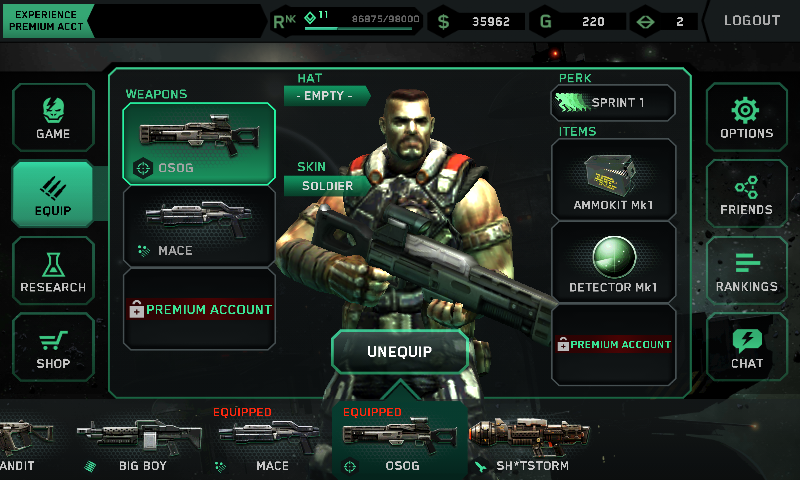
Shadowgun: Deadzone
Character Loadout Screen

There is also a "Casino" feature built into the games main menu.  Each day your account will be given a token (or 2 or 3 depending) and you can use these tokens to take a spin on the Slot Machine.  The reward for playing the Slot Machine is in game gold.  This gold can be used to buy cosmetic items such as skins, hats, etc. for your character.  As the tokens are given to your account, you do not have to pay "real-world" money for these.

There is also a buddy list, you can log in with your Facebook account, and you can chat (and voicechat if you have a premium account).

Game Modes

Shadowgun: Deadzone

Currently there are only two game modes: Deathmatch and Zone Control.  Deathmatch is your traditional free-for-all game mode.  Where every player loads out into the map and spends the matches time limit trying to frag each other.  He who has the highest killscore wins the match.  Meanwhile, Zone Control is a little more tactical.  Each map is contains a series of "Control Points" which also acts as spawn points.  Two teams (red and blue) each fight for the duration of the match to gain control of more points than the other team.  Eventually this leads to some pretty epic battles over points in the middle of a map.  I spend a lot of time playing Zone Control as the strategy aspect of this game mode is a lot of fun.

Premium Features?

So at this point you may be saying, "Wait a minute? A game with these features, and it's free?".  That's right, it is free to download and free to play.  There are a couple ad screens you will see while playing, but the ads are for Shadowgun: Deadzone itself.  Players have the option to upgrade to a "Premium Account" if they choose.

Premium accounts get the following:
-50% more Money and Gold for Playing Matches
-Increased Experience Points for Matches Played
-Access to Premium Servers
-Voice Chat

Premium features can be purchased using your in-game gold or you can drop some "real-world" money for it as a microtransaction.  Premium accounts can be:
-1 day 
-3 days ($00.99)
-1 week ($00.99 USD)
-1 month ($2.99 USD)
-3 months ($9.99 USD)

For example, I ran the month of January as a premium account.  And the immediate advantage is being able to change between more than just the original 2 character skins.  For me the cost is very little and if it counts towards helping the developers build updates for the game; then I am happy to support it.  The Premium cost is a one time charge and no recurring.  So when it runs out, you are dropped back down to a "Free Play" account status.  Which means you receive less money and experience points.


Overall

This game should be considered a AAA title.  It offers gameplay that I have yet to find in any other mobile game.  And it feels like a big-console experience that you can hold in your hand.  With great controls and graphics and an online experience like no other on a mobile device.  I highly recommend this game.  With a limited selection of maps and only two game modes, I would love to see this game grow to offer more as time goes on.  But even with those limitations, I still give this game 5 Stars.

To play it, you will need a device that has at least 512MB of RAM.  For iOS device users this includes: iPhone 4 (and newer), iPod Touch 5th Generation, and iPad 2 (and newer).  For Android users a modern device with at least 512MB of RAM and running Android Honeycomb and newer.
I have been playing this on both my Samsung Galaxy S2 and my Google Nexus 7 and it plays smooth and fluidly on both devices.

Check it out:

Tuesday, February 12, 2013

OTG Cable for Nexus 7 Makes Moving Files Easy

0 comments
As mentioned in a previous post, there is a USB cable you can purchase for your Nexus 7 that will allow you to read from USB Flash Drives (and write to them if you are rooted), use game controllers, etc.  But keep in mind that this cable is not a standard USB cable.  It is called an "On-The-Go Cable" or "OTG Cable" for short.  They are fairly cheap to buy, and in my opinion are well worth the investment for any Nexus 7 owner.  Does it work?  Do you have to be rooted to use it?  Why even worry about it?  The answers (respectively): Yes, No, and It's Awesome. See below.


Does it work?


In short, yes the OTG cable works marvelously.  Seeing as how it is just a cable, there aren't many ways it wouldn't work.  It fits the small connection on the bottom of the Nexus 7 where you plug it up to charge.  The opposite end of the OTG Cable, is a female USB connector.  This allows you to hook up pretty much any USB Flash Drive or game controller to it.  This makes it possible to watch movies or play music or even just access files directly from a USB Flash drive without the need of transferring these files directly to the Nexus 7 using either a PC or services like Box.

If you are using your Nexus 7 as it is straight out of the box (i.e.: not rooted) then you will need an app from the Google Play store to be able to read the USB Flash Drives.  And without Root access, that's about all you can do.  There have been some reports of certain apps allowing play with a PS3 gamepad without root, but not every app supports it.  So if you aren't rooted and just want to be able to access other files using flash drives:

-Visit the Google Play Store and download the Nexus Media Importer by Homesoft ($2.99 USD)
-Hook up the OTG Cable and a flash drive.
-The Nexus Media Importer app should launch automatically.
-Select your files and have fun!
*Just note that without root access you can only read from USB Flash drives, you can't write back to them.


Do you have to be rooted to use it?


No you don't.  As mentioned above, you can use it without root access.  However, you're somewhat limited to what you can do with the OTG Cable unless you do have root access.  With root access you can read and write to and from USB Flash Drives.  You can also hook up a PS3, Xbox 360, or even Wiimote to your device for gaming.  Using these devices does typically require an extra app to make it easier to setup (for PS3 controllers use Sixaxis).

And for reading/writing files I use the Stickmount (FREE) app and ES File Explorer (FREE) app to access and transfer files as needed.

Why Even Worry About It?


So why even worry about it.  In short, if you have no plans to root your device or you are completely happy with your Nexus 7 as it is out of the box, you may not even care about using an OTG Cable.  But if you're like me and you like to read books/comic books digitally, or watch movies and videos offline, or even play games with a gamepad; then the OTG Cable is a great workaround.  The Nexus 7 is a slick device, no doubt about it.  But one of the complaints have been the lack of an SD Card slot (or even a full sized USB Host port).  Pretty much, whether you bought the 16 or 32GB capacity versions, that's all the space you get.  With an OTG Cable you not only get the internal storage of your device, along with as many USB Flash Drives you could possibly want.  This really opens up your devices storage options especially if you get tired of using your PC to transfer files to and from your device.

Get Your's!


I use the IVSO Nexus 7 Tablet Micro USB Host OTG Cable from Amazon which cost me after shipping: $4.97 (USD) which is pictured above.

Wednesday, January 30, 2013

Nexus 7 Rooted via the Nexus 7 Toolkit

0 comments
Nexus 7
Last night I did something brave.  Something I swore I wouldn't do for a while after I purchased my Nexus 7.  Apparently, I lied to myself.  As I a little better than a month out of my ownership of my Nexus 7, and today it is rooted.  This isn't a definitive walkthrough.  But it will hit the high spots.  And we can do it in about 4 steps that make the rooting process so easy it's almost ridiculous.  Be warned, the rooting process does perform a factory reset during the process which means all of your user data and apps will be erased from the device.  Please backup any information or data you may need before starting the rooting process.  Read below.


Step 1: Drivers

First thing first, you need the ADB drivers for your Nexus 7.  This can be accomplished one of a couple of ways.  Way #1: download the Nexus 7 Toolkit and let it install the correct drivers for you.  I attempted this, and it didn't work for me.  I am using Windows 8, and I had read there were some funny issues about Nexus 7 driver installation under Windows 8.  So I had to go to Way #2.

Way #2 is manually downloading the drivers from the ASUS site (click here).  This will download the USB Driver Package to your PC.  Simply unzip this file to a folder you can easily find.  Then open Windows Explorer, right click Computer and click on Properties.  Look for the link in the properties box that says "Device Manager".  Look for an entry that had a yellow caution sign beside it that reads "Nexus 7".

Right Click the "unknown" Nexus 7 device and select to Update the driver.  Follow the wizard and point it to the USB Driver that you downloaded and unzipped.  This should fix the driver issue.

Step 2: USB Debugging has to be Enabled

On the Nexus 7 the "Developer Options" menu has been hidden.  To access is, open the "Settings" app on your Nexus 7, tap on "About Tablet".  Find "Build Number" and tap 7 times.  You will see a prompt counting down how many taps until you become a "developer".  This unlocks the "Developer Options Menu".  Now tap your back button to return to the "Settings" menu and then tap into the "Developer Options" menu.  Locate "USB Debugging" and enable it.

Step 3: Download and Install the Nexus 7 Toolkit

This is where the magic is going to happen but you have to be running this from a Windows PC with the drivers mentioned above (unless you let the toolkit install drivers for you).  Visit XDA Developer's Nexus 7 section and download the Nexus 7 Toolkit.  There is a lot of good information on this page, and if you have any desire to root and load custom ROMs on your device then please frequent XDA.  XDA is a great community for this kind of thing.  Anyways, click here to visit the thread about the Nexus 7 Toolkit and download it.  Once you have downloaded it, install it.  It will place a shortcut on your desktop for future use.

Step 4: Hook it all up!

Hook your Nexus 7 up to a USB Cable and your PC.  Launch the newly installed Nexus 7 Toolkit.  And you'll be greeted with a window that has a black background and green text asking if you want to check for an update to the toolkit (select No).  Then select your build of Android (if you aren't sure go back into your Nexus 7 settings and click on "About Tablet" it will tell you Android 4.2 or 4.2.1 or other).  Back in the ToolKit enter the number option that matches your version of Android.  For example, mine was 4 for Android 4.2.1.

If the Toolkit see's your tablet, your tablet's serial number will be just bove the main menu.  If you see it there, you're in good shape (see the pic below).  I selected #8 from the menu for "1-CLICK for ALL...".  Essentially, it will go through an automated process of unlocking the bootloader, rooting, renaming the recovery, installing custom recovery and busybox.  The whole process takes less than 10 minutes to finish.  It is prompted.  So just follow the instructions as the program prompts you.  The Toolkit will handle all rebooting of the Nexus 7 and installation of all software as needed during the process.  So basically sit back, answer a few prompts and let it ride until it is done.  Once the process is finished your Nexus 7 will reboot and the program will prompt that the rooting was successful.

If you are curious that it infact worked, download one of the many Root Checker apps from the Google Play Store and check.  Now you can flash custom ROMs and run apps that require root access.  One of my reasons for rooting was to use my PS3 controller for some of my tablet's games.  But we'll cover that in another post.

Links used:

Nexus 7 Toolkit from XDA-Developers (does not require site registration)

Wednesday, January 2, 2013

Nexus 7 Review

0 comments
Nexus 7
Shortly after Christmas, I found myself purchasing a Nexus 7 tablet.  And believe me when I say they were few and far between in our local brick and mortar stores.  In early December I saw them on sale at a two of our local Walmart stores.  But apparently they were a pretty hot item this year.  I ended up finding one at a Gamestop about 30 miles away.

Needless to say, it was well worth the near 60 mile round trip.  So here is my quick review.

First up, like most tablets or mobile devices; there are several different versions of the device.  The Nexus 7 was made by Asus for Google (as Google doesn't produce hardware themselves).  The Nexus 7 is a 7 inch, Tegra 3 tablet and it comes in three flavors.
- 16GB Wifi only                               (MSRP: $199.00)
- 32GB Wifi only                               (MSRP: $249.00)
- 32GB Wifi & 3G (3G via AT&T)     (MSRP: $299.00)

Most of the local brick & mortar stores around here carry the 32GB WiFi only model for $249.  At first, $249 may sound a little steep.  But when compared to the price of devices like the Kindle Fire HD or the Nook HD it's still pretty much in the same price range.  And from the software perspective, the Nexus 7 is quite a bit more open (out of the box) than either Amazon or Barnes & Noble's offerings.

The market definitely has no shortage of tablets and mobile computing devices, so what makes the Nexus 7 stand out?  For me, it's the software that jumps out at me.  The Nexus 7 runs Android 4.1 (Jelly Bean) out of the box.  So big deal, it runs the latest version of Android... Who cares?  Well, most Android based devices include apps that aren't used of wanted.  Smartphone's are the same way.  My Galaxy S2 from Sprint came preloaded with Sprint branded apps and even a couple games that I didn't really care to have on my device without my choice.

This doesn't happen with the Nexus 7, reason being it runs pure Android without any vendor UI overlay or without any Vendor specific apps preloaded.  What you do get preinstalled on the devices are the apps from Google that are run of the mill on Android devices:
-Google Play Store (and associated apps)

So what about the specs:
- Tegra 3 Quad-Core Processor
-1GB of RAM
-Storage Capacity: 16GB or 32GB
-WiFi 802.11 b/g/n
-Bluetooth
-NFC
-3G only available is the 3G model
-Front Facing 1.2MP camera
-4325 mAh Battery (rated at approximately 8 hours of battery life)
Screen Specs:
-7 inch (1280 x 800) at 216ppi
-Back-lit IPS display

Other Features:
-Microhone
-Accelerometer
-Magnetometer
-GPS
-Gyroscope

You may have read through those specs and said: "What a minute, where is the SD Card slot or the rear facing camera?!".  And you'd be right, the Nexus 7 does not sport either of those.  And to be honest with you, I haven't even missed them.  Here's why.  My phone has a 8MP camera on it.  The majority of my pictures are taken while I am out and about in the world on a daily basis.  I have a 10 inch Android Tablet that sports both of the Nexus 7's missing features and I rarely use them.  I have taken less than 10 pictures with my 10 inch tablet's rear camera.  I use the SD card slot only to load a small collection of ROM's to play.  That's it.  So not having these two features didn't hinder me from picking up the Nexus 7.
OTG Cable

And if these missing features might deter you from checking out the Nexus 7, then don't let it.  Because there is a work around for the missing SD Card slot.  You can pick up what is called an "On the Go" USB adapter.  There are a couple types of these available on Amazon.  The popular one basically splits the micro-USB connector on the bottom of the device into two USB ports that allows you to connect Flash Drives for extra storage of file transfers (although some of the file transfer features will require ROOT access).  That means it is still possible to swap files on the fly.  Albeit, with an extra cable.  The good news is that most of these adapters are really dirt cheap.  And there is even one that has a card reader/USB/HDMI Output on it as well.

So enough about the specs, how does it perform?  So far I have read books on the Nexus 7, watched quite a bit of Netflix programming on it, surfed the web and social networks, and yes; I have indulged in quite a few games as well.  Everything works just as smooth as silk.  The games I have played so far include:
-Need for Speed Most Wanted
-Dark Meadow: The Pact
-Sonic 4 Episode II THD
-Beach Buggy Blitz
-Marvel's Avengers Initiative

And every game has been fast, no lag, responsive and an overall fantastic experience. I am excited to load up the multiplayer version of Shadowgun to see it in all it's glory.  One of the common complaints tends to be more with the apps from Google Play; as not all of them are designed to work on a 7 inch display.  What I mean is the Facebook app downloaded from Google Play is essentially the same as the phone version of the app.  This has been an issue with Android pretty much since Day 1.  They call that "fragmentation" and is one of the large reason's Apple fans slam Android fanboys.  For me, there are so many other awesome apps out there, I can't let the quirks with just a couple hinder my overall experience on something that really isn't the tablet's issue in the first place.

The 7 inch screen size is perfect for reading books, as it feels like using a paperback sized book.  And the tablet is pretty light (weighing in at 340g) so you can easily hold it with one hand and not tired of holding it.  And when paired with books from Google Play (or as I prefer to use Aldiko), it really feels great kicking back on the couch with a good book on the Nexus 7.

Battery Life
Sure, it's got great specs with a great screen size and can run movies and games without a problem.  The battery life must be terrible, right?  Nope.  In fact, the battery life is the best I have seen on an Android device this size.  For example, over the weekend I pretty much carried the Nexus 7 with me everywhere I went.  I haven't altered any of the display or power settings from their default settings.  At the end of the day Saturday, I looked at the Battery usage and it had been off of the charger for a little better than 9.5 hours and I was still showing around 32% battery left.  My usage that day was connecting to three different WiFi connections, web surfing/Facebooking for a while on each.  Did some lite reading, used the web surfing to find resources and information on PC repair for a friend, watching YouTube, playing Need for Speed Most Wanted, and later that evening watching an episode of "Sons of Anarchy" on Netflix.

That is way more activity than my phone could handle without begging for a charge midway through the day. So you shouldn't have to worry about battery life.  If you can charge it up before bed, you'll not have much to worry about.  The only issue I can forsee is that the battery is enclosed (much like the iPad devices).  So you can't replace it when it's charge cycles are used up.  Hopefully, by the time that happens; it'll be time to upgrade devices anyway.

Cons
The Nexus 7 only has one downside that I have found thus far and I wanted to save it for last.  And really, it isn't that big of a deal (it can be resolved); but out of the box it may be an issue for some people.  The Nexus 7 has one speaker bar in the bottom of the back of the device.  Out of the box with the volume turned all the way up, it is still somewhat difficult to hear the audio anywhere but in a semi-quiet room.  You can however download a Speaker Booster app from Google Play that will fix this.  So not a serious issue by any means.

Overall Verdict: Must Buy!
Today marks 1 week spent with the Nexus 7, and I haven't regretted purchasing it yet.  It is a great device, offering the latest and greatest that Google has to offer on the software side.  And the awesome specs that Asus slammed into the Nexus 7's casing.  I honestly gave thought to initially purchasing the iPad Mini.  But with it's price point higher than the Nexus 7's, and the fact I really didn't like the idea of having to use iTunes again.  So I veered away from Apple's offering.  And honestly, I'm glad that I did.

For more information on the Nexus 7 please visit:
Google Play's Nexus 7 Product Page

Friday, October 28, 2011

Android Coming To A Gamestop Near You

0 comments
Seriously?  Yep, sounds that way.  Looks like taking a bite out of a rather popular fruit/device maker wasn't all that Gamestop had planned.  Just the other month Gamestop announced they would be taking trades and selling Apple's iDevices.  And now it looks as if they are actually branding their own Android based tablet as well.

I for one, fear that they may be too late to this show for anybody to care.  Especially with the controversy surrounding them the last several months.  If they are willing to snatch coupons from game boxes, why would they be willing to do anything better with an actual tablet device.  Even when they are already carrying another brand of a similar type of device.  I'm actually surprised that Apple didn't include in their agreement with Gamestop that they be the only device provider for the game chain.

Anyways, if you'd like to read the entire story, swing by:
TechCrunch

Wednesday, October 26, 2011

Tablet Owners Not Paying for News, Surprised?

0 comments
It goes without saying that the way the world consumes content has changed.  Ten years ago, it was very common for people to come home from work and sit down and watch the evening news and read the Sunday paper.  Fast forward to 2011 and how many people do you see sitting in their office at lunch reading the paper.  How many of us actually sit down and watch that television show they call the 'Evening News'?

The vast majority of us access our news via online means.  Whether it be subscribing to a news source via online editions or issues or just reading the headlines on Google News.  So it's shock to me when the Pew Research Center released their findings in the study as to whether or not tablet owner's are willing to pay for news content.  And their answer was 'No'.  Something like 14% of tablet user's who use their device for news content polled had actually purchased access to news content.

And while a lot of times these 'polls' can be ignored because they are sometimes so far out there they just don't make sense.  I tend to believe this one.  Seriously, why should we be forced to pay for news content when there are so many reputable places online to get the same stories for free of charge?  I can honestly say that I get into reading the news more now than I ever have.  And it has become a nightly habit to check the headlines before hitting the hay for the night.  I'm sure this trend will continue unless every reputable news source decides to lock down their services for cash.  Which I don't foresee happening anytime soon.

Saturday, October 15, 2011

Tablets Owners Do Play Games!

0 comments
If you own a tablet, do you also play games on it?  My answer is definitely yes!  Why would you carry around a device with an awesome display, and plenty of horse power to play games.  And then not play them?  That sounds crazy to me!  And with mobile gaming becoming more competent as weeks go on; making them attractive to more than just the casual puzzle gamer.  Why not?

Well, apparently a study was conducted for the month of September that concluded that 23% of U.S. tablet owner's played at least one game every day on their tablet during the month.  This equates to two-thirds of tablet owner's enjoying mobile gaming goodness.  Other popular activities enjoyed via tablets inlcude: listening to music, YouTube, streamed online content (like TV shows), and of course using their tablets as e-readers.  Whether it be magazines or ebooks.

What does this tell us?  The numbers seem to suggest that more and more people are using tablets.  No surprise there.  But one thing comes to my mind when we see these kind of studies.  If tablet use is becoming so prevalent; then how come we don't see people at Starbucks and at the Mall sitting around messing with their tablets?  Around my area I see plenty of people sitting around playing on their smartphones.  But not so many tablets.  I, for one would rather sit at home and jam away at a game, rather than actually play it on the go.  Mostly because out in public there is some much going on I find it hard to concentrate fully on tasks like games and reading lengthy articles.  Just not my cup of tea.  But sitting on the couch with my feet kicked up...That's game time around my house.

For more info on the exact study and statistics visit: http://8b08ac42.tinylinks.co

Saturday, October 8, 2011

Netflix + Iconia A500 Hands On!

2 comments


Now that I have had my hands on a working Netflix app on my Acer Iconia a500 for a couple of days I figured it would be good to post a follow up to see how things are going with it.  And I am happy to report that it is working just fine.  The Netflix Browser Interface resembles that of any other mobile device's Netflix app.  Once the streaming has started I have experienced some fuzzy video for the first few seconds of the flick I'm watching and then it clears right up.

I can only assume this is due to the app adjusting video quality to the available network connection.  Regardless, it doesn't detract from the experience.  I have encountered no force closes or crashes either (my iPod Touches Netflix app is crash happy) which is awesome.  All in all the app has been a great experience and I'm so happy the guys at the XDA Developers forum took care of it!

Wednesday, October 5, 2011

India Has a $35 Dollar Tablet

0 comments
Last year some news headlines hit the world in a storm when it was reported that some folks in India were trying to develop a cheap tablet.  Their goal was simple, to develop a tablet and keep it cheap and affordable.  What they came up with was the concept for a $35 tablet.

Now, first and foremost let's keep this in perspective.  At $35 for a tablet, you're not going to be getting much.  But they endured anyways, and now a Canadian company by the name of DataWind is indeed manufacturing these devices for the people of India.  Don't expect these puppies to show up here in the U.S. or at least not anytime soon.  And if they do migrate to the U.S., I definitely wouldn't expect the tablet to retail for $35.  Maybe somewhere between $50 to $100.  Our tablet market just isn't willing to stoop that cheap quite a yet.

And if they do roll out for $35 bucks a piece, I'd buy one for each room in the house.

So let's take a look at what $35 dollars would buy you in India:
-7 inches of screen real estate.
-2GB storage capacity.
-366MHz Processor
-Wifi
-Running the Android OS (not sure which version)

In other words a 7inch tablet with smartphone guts from 3 years ago.  But for simple tasks like connecting to the web and web browsing; I'm sure it's probably enough.

Monday, October 3, 2011

Yes, there are other Kindles too

0 comments
Last week one of the biggest stories in the headlines covered Amazon's Kindle Fire tablet/e-reader.  But what seemed to fall through the cracks were the stories of what other Kindle's were also announced.  Amazon announced it will also be releasing two more versions of the monochrome Kindle r-readers for those who aren't ready for the tablet experience.

So what's new with these?  Well, they are still sporting the monochrome e-ink screen; but now they include multi-touch features as well.  One of the other changes about the Touch versions of the Kindle, is that user's will no longer have to 'swipe' their finger across the screen to turn the page of the ebook.  Instead, a simple screen tap will handle page turning as well.

For those who are curious as to what e-ink screens are: they are monochrome screens for mobile devices that allow no-glare visibility in daylight and brightly lit rooms.  They use no backlight; instead they use ambient light in the room to produce the vibrant image on the screen.  E-Ink screens are great on battery life due to the lack of a backlight necessary to light the display (unlike standard tablets).  One of the drawbacks to e-ink screens is that in low-light/dark rooms or areas; you will need to use a booklight (they make booklights that attach to most e-readers) to create ambient light in order to see the image on the screen.

There are two versions:
-Kindle Touch (WiFi) for $99 (USD)
-Kindle Touch 3G for $149 (USD)

You may want to note that the 3G version of the Kindle Touch will limit 3G access to the Kindle Store for buying ebooks and searching Wikipedia.  The 3G version does include WiFi access as well.

For more information on the new Kindle Touch swing by: http://www.amazon.com/gp/product/B005890G8Y/ref=famstripe_kt

Wednesday, September 28, 2011

Amazon's New Tablet Dubbed 'Kindle Fire'

0 comments
Looks as though Amazon's new tablet that has taken the news by storm will be called the 'Kindle Fire' and should retail for $199.  It will feature a 7 inch screen and will be Android based.  If you check the article over on CNEThttp://news.cnet.com/8301-1035_3-20112714-94/amazon-unveils-kindle-fire-tablet-for-$199/?tag=mantle_skin;content

You may notice that the device seems to resemble the Nook Color by Barnes & Noble.  The release of the 'Kindle Fire' will be the first actual tablet offered directly by Amazon.  As the previous versions of the Kindle were strictly e-book readers sporting the e-ink screens (which are monochrome).  The device does not include a camera or microphone and will only connect to Wifi networks (sorry, no 3G this time around).
The Nook Color by Barnes & Noble

So, it looks like for $199 you will not be running Honeycomb on it, but for $200 bucks it doesn't look like a bad tablet.  And if you know someone who loves their Kindle e-book reader, than I would recommend the 'Fire' for them.  Essentially, you are getting the e-book reader everyone knows and loves along with a color screen and more tablet like features.

Tuesday, August 2, 2011

Should I Buy a Laptop or a Tablet?

0 comments
I get asked this question at least once a week.  So I figured I'd take a moment and elaborate on my answer for those online who may be wondering the same thing.  I personally own an Android based tablet (Acer Iconia a500), have access to an iPad (first generation), and of course my desktop pc, and my wife's laptop.  So coming from the standpoint that I have access to each of the major methods of common, everyday computing; here is my advice.

The argument for a PC (personal computer) is a completely valid argument.  Let's be real, in this day an time you have two types of computers: the Windows based PC, and a Mac.  What you're looking at from the PC standpoint is probably a Windows 7 based PC.  If you want to spend more, get pretty good customer service, but be somewhat limited to the software you can run; go Mac.  Nothing against Apple or their Mac's; I just happen to bump into about a dozen Windows-based PC's and laptops for every 1 Mac I see in the wild.  Those who have Mac's absolutely adore them; so no Mac hate here.  lol

With a PC (or equivalent) you're looking at running a wide selection of software applications, the common web surfing and everyday computer usage.  Maybe some Facebook or Farmville, and you have the ability to either buy software from a brick and mortar store, or downloading from an e-store online.  You'll have the ability to hook up to a local or network based printer, and have the option to go either Wireless or Wired networking.  Most PC's are upgradable so adding things like memory and large hard drives later (or the need to add a new graphics card for gaming) becomes a better solution than replacing the unit at a later time.  Some upgrade options aren't available when using a laptop (such as a videocard upgrade); however, adding more RAM or a larger hard drive later is a more viable solution.

The argument for a tablet (or equivalent) is also a very valid point.  Tablet's are designed for one thing: mobility.  Yes, many of them do look pretty sexy and sleek too.  However, they are meant for the mobility and convenience of a laptop or netbook, but without the bloat.  There are some Windows based tablet floating around out there, that use a current version of the Windows Operating System but optimized for the touch input.  However, most tablets you see with either be running a version of Android or will be an iPad running iOS from Apple.

What can you do with a tablet?  Pretty much any of your basic, every day computing can be thrown at any of the modern tablets on the market right now.  It all comes down to which side you want to lay down your rifle for.  With Apple's iPad you're looking at paying for the device and for most of your apps you can download that are iPad optimized.  From my experience looking around Apple's App Store, some of their iPad version apps are more expensive than the iPhone versions.  However, with the iPad and iOS, it just works.  Right out of the box.  There is very little room for error (as long as you don't jailbreak it).  That opens a whole new door that can be awesome, or cause headaches depending on your goal.  But from a stock standpoint, the iPad is a very competent tablet style device.  It has great accessories available and plenty of apps to keep you busy.

The other side of the tablet world right now revolves around Android based devices.  Most of the $400-$600 range Android tablets now are dual-core processor based tablets.  They are more than competent for web surfing, gaming, and media consumption.  They aren't quite as smooth as the slide, tap, and use method that the iPad employees; meaning it feels like a computer more than a big iPod.  The same can be argued about Android apps.  There are plenty of apps in the Google Android Market to appease your appetite.  However, the actual "Tablet Optimized" category is pretty low.  With that being said, many of the other apps in the market will work on a tablet without any trouble.  Many times the Android tablets are comparable if not cheaper than the iPad.  Available accessories are out there, but it depends on which tablet you use as to the level of what is available for it.

Personally, I find a tablet to be a great complement to my daily computer usage.  I use a desktop PC for most of my work and gaming based tasks.  Then when I need to casually surf, check me email, or compute on the go; I roll out with my tablet.  If you are looking to replace your PC with a tablet, I'd hold off for the time being.  I just don't think tablet's are designed with that intention just yet.  If you are new to the computing world, and only have needs to surf the web or read a book; by all means, a tablet may be best for you.

It all comes down to your personal needs.   My wife uses her laptop a couple times a week for Facebook access and web surfing.  For her, a tablet would be ideal.  Simply because, she doesn't need to level of usage that would warrant a full sized PC or Laptop.  But would give her the similar features.  But for me, I have to still use a desktop at least until I give up some of the PC only games I play.  :)

Monday, July 18, 2011

Acer Iconia Tablet a500 Update Woes...Weekend Update

0 comments
Still no news as far as the Honeycomb 3.1 Update goes.  But to be fair, I haven't had a lot of time this weekend to bug Acer Support about my update woes.  I'll be hot on the trail again on Monday afternoon, so more to come!

Wednesday, July 13, 2011

Acer Iconia Tablet a500 Update Woes...

0 comments
A quick update on my issues with receiving the Honeycomb 3.1 update after selecting "Remind Me Later" in the notification dialog box that popped up on my tablet.

As of 1:00am on Wed. 7-13-2011: Performed numerous manual checks throughout the day and evening.  Still no update available.

Per my live chat dialog from yesterday, the Acer Representative I chatted with told me to not be surprised if the update rolls out to my device "either tomorrow or the next day".  Well, looks like "the next day" just started. We shall see if by the days end I have been prompted to download the update.

I'll report back later.

Tuesday, May 24, 2011

Got my Android Tablet!

0 comments
Well, this past Thursday I finally bought an Android Tablet.  I chose the Acer Iconia A500.  Best Buy currently carries the A500 for $449.99 U.S.  It rocks the Android 3.0 'Honeycomb' out of the box.  And let me say, it is pretty freakin' sweet.

This isn't a comprehensive review by any means, but I'll quickly hit the highlights.  This tablet is sporting a NVIDIA Tegra 2 Dual Core mobile processor and 1GB DDR2 memory.  The A500 is a wifi only tablet, so no need to add it to your mobile carrier's data plan.  With public wifi being so readily available these days here in my area I don't have much of a need for a 3G connection at this time (this is subject to change).  This device also offers Bluetooth, A-GPS, 802.11 b/g/n WLAN, HDMI, Dual Speakers (with Dolby), MicroSD card slot, 16GB of internal storage, front facing and rear facing cameras.

The unit is slick to use and very impressive.  A lot of people have mentioned on other sites that this tablet is pretty heavy.  Personally, I don't have a bit of an issue with it's weight.  I had noticed that the battery life seemed to dwindle down fairly quickly.  After doing a little snooping around the devices settings menu I found the 'Battery Use' sub-menu which pointed to the 'Cell Standby' process as using a lot of my expended battery power.  After a few minutes of snooping around forums online, I found the simplest fix that has worked for me (without downloading an app from the Google Market).

I simply put the device in 'Airplane' mode and leave it in airplane mode while then activating the Wifi connection.  Wifi will stay turned on and the device will remain in airplane mode as well.  After doing this I have noticed a huge difference in battery life for the better.

The only other issue I have is voice chat is pretty limited at this time.  My wife has an HTC Evo 4G and occasionally  we'll use something like Yahoo IM to do a video chat from my PC to her Evo.  Which works great.  Right now due to limitations on the Evo (running Froyo) Google Talk's videochat is non-existant.  Supposedly the Evo is in line a the update for Gingerbread later in June which should alleviate this issue.  Honeycomb optimized apps are at a premium right now due to the fact that there just aren't that many apps optimized for Honeycomb.  However, most of the other apps I have tried have worked flawlessly.

Now that I am getting pretty familiar with Honeycomb, look for a few reviews to show up pretty soon.  Right now I am playing through Cordy, and have several other games in mind too.  So check back soon.

Thursday, March 31, 2011

Tablets, iPads, and other Manufacturers...Oh My!

0 comments
Looks like the old motto: "If you can't beat 'em, join 'em", isn't one that Dell & HP exec's are even considering.  Instead, they decided to go the "All-American" route and start smack talking.  That's right.  We all know that Apple has been pretty much dominating the tablet corner of the technology market ever since the iPad was released.  Myself, not such a huge fan of how Apple keeps their gadgets locked down.  I like having the freedom to do what I want with my tech.  With that said, is iOS bad?  Nope, it's a pretty good system for a mobile device (all Apple based restrictions aside).  And it is very simple for people to use; people who may very well shun other forms of technology.

So, with the recent release of the iPad 2 by Apple; we are starting to see the feathers on their competition start to rise a little.  No doubt other manufacturers are starting to take notice that they are quickly losing ground in the tablet industry.  Recently, HP's Senoir VP of America's Solution Partners spoke out for his distaste in how Apple handles their business relationships with their partners.  Going on the record to say "Apple's relationship with partners is transaction, completely" and carrying on to say "Unlike Apple, HP is a very friendly channel" in an interview with CRN.  The point of his interview eventually leads up to his concern for their new line of tablets that will be touting the webOS.  Personally, I feel he should be very concerned about the upcoming system.  Reason being, if you follow technology you may have heard of webOS.  The system was developed by Palm (the makers of the once famous PDA brand); and was used in their debut phone: Palm Pre.

The Pre was a good phone, and the software got great reviews.  Much like Android it is running on a Linux kernal.  However, it seemed that the Pre couldn't stand it's ground against the iPhone.  Eventually Palm was facing a dire future, and HP acquired the company.  Now they are using the webOS for their mobile devices. And how many advertisements do you see on the web or tv for webOS?  Not many, if any.  I know their tablet line hasn't released yet.  But the PR departments are going to have to start feeding the public some pictures and footage of how this works within their products and start building fanfare.  Without that, I'm affraid a lot of people will set webOS on the backburner.  That would be bad.

Why?  Easy, another company competing in the tablet market will create even more competition.  Competition is good for us (the consumer) because it helps drive down costs as we raise demand.  Maybe then we can actually get a decent Android tablet under the $500 mark without having to buy an e-reader and mod it.

Enough on HP's stance, what is Dell saying?  In a recent interview with CIO Australia, Andy Lark (Global Head of Marketing for Dell) believes Apple will fall and Android will reign (not a direct quote) in the mobile market.  There is even room for Windows there too.  I have to hand it to Dell.  They have been supporting multiple operating systems for some time.  At one point, they allowed purchase of new systems with choice of Linux or Windows.  And it appears that they will continue that mentality with their newest tablets (which are slated to come out later this year).  Mr. Lark went on to say that their strategy is "multi-OS"; meaning they will offer Windows 7 or Android's latest rollout of Honeycomb on their tablets.  That is also a good thing.  People like choice and options.

Right now, it seems most mobile device users are either fans of Apple or Android devices.  Is there room for another player (HP/webOS) in this market?  Will Apple's iPad eventually get larger than itself and drop from it's high place?  Will their be an Android uprising in the future?  My answer, who knows.  But one thing is for sure, the future for computing is exciting and it's a great time to be a gadget lover.

My only hope is that we can eventually get our hands on a tablet without shelling out $500 or $600 dollars for the low end model.  My opinion, that should be the target price for the high-end models of these devices.  And somewhere are current Netbook costs should be where we see the devices price points sitting.  It's coming, but all in good time.  Until then, Happy surfing!


Source Article: http://www.appleinsider.com/articles/11/03/30/dell_hp_execs_lash_out_at_apples_ios_successes.html

Wednesday, May 12, 2010

This Week In The News: Steam for Mac, Google Tablet, Retirement for Space Shuttle

0 comments
Sorry for the absence of news here over the last few weeks. The personal/work life has been crazy.  Anyways, on with this weeks news.  Mac Gamers Unite! Google Tablet? And farewell Atlantis!

First up, Mac gamer's rejoice!  Steam has been released for the Mac.  Go ahead, hurry and download it.  There are currently 57 titles available (see link for list: http://store.steampowered.com/browse/mac ).  Also until May 24th, Portal is free for everybody!  Also check this out, if you have downloaded a title for Windows, than the Mac version is available for free.  Pretty sweet deal!  Buy one title and play cross platform.  Nice job Steam!

Next up, looks like Google (in the never ending quest for world domination) are in talks with Verizon over a tablet.  Despite the fact that the iPad has been a pretty good success for Apple.  Can Google do the same, or trump Apple's accomplishment.  Time will tell.

Space Shuttle Atlantis is set to launch for it's final mission on Friday.  This mission is to drop off supplies and replace some parts on the International Space Station.  This sets the stage for the last three shuttle missions by NASA; which will also mark the completion of the International Space Station.  Kudos!  http://news.cnet.com/8301-19514_3-20004796-239.html

Until next week!  Happy surfing!

Wednesday, April 7, 2010

This Week In The News: In A Galaxy...wait My Living Room?

0 comments
This week in the news we have several newsworthy events.  We have a new announcement from George Lucas, the iPad has finally been set free into the wild, HP is going after the iPad, Xbox 360 Update, and my short review of 'The Clash of The Titans-3D'.

First up, this week Mr. George Lucas (yes, of Star Wars fame), has made an official announcement.  There will be a new 'Star Wars' heading our way in the future.  However, don't look for a Sequel of Prequel or the Originals.  Instead, look for a 'Star Wars' based sitcom.  That's right folks, apparently if you can't beat'em, join'em.  For years now, other shows/comedians have been polking fun at the 'Star Wars' Universe.  Remember all of the Family Guy one-liners and even the 'Blue Harvest' cartoon (all of which where awesome).  Even 'Robot Chicken' has had it's fun with the series.  According to the article at the 'Chicago Tribune', Mr. Lucas will be gaining assistance from Seth Green (also from Family Guy and Robot Chicken) to bring this comedy to light.  What will Lucas do next?  Only those strong in the Force can tell...


Secondly, on April 3rd we got the hear Mr. Steve Jobs yell: "Release the...iPAD!".  Yep, it's on the streets now.  I'm sure there are a lot of happy iPad user's out there in love with their iPads.  However, I can forsee that the fun isn't over quit yet.  Now that Apple took the initiative to release the first tablet device (not including the notebook tablets that have been around for several years); it will be interesting to see how the market follows suit.  Remember when the iPhone was released?  There were several manufacturers that attempted to make 'iPhone Killers' or at best worthy competitors.  Will the same happen in the tablet market?  Most certainly.  There are smaller companies that we haven't heard much about until now (i.e.: FreeScale).  FreeScale; for example, is attempting to create a table device that runs: Android, Chromium OS, or Linux Operating Systems.  And they are trying to roll it for a $200 retail pricetag.  Check it out: FreeScale's $200 Tablet.

Also in Tablet News this week; move over Apple, here comes HP.  This week HP released details for their new tablet called the "HP Slate".  The device does look promising.  HP's tablets boasts HDMI-Out, Usb Port, Webcam, 3MP camera, and SD-Card Reader.  Some are saying it's a netbook minus the keyboard.  Check out more details at: HP Slate Details.  Keep in mind that yes, Apple made the first tablet; however, hopefully competition will jump in a follow suit.  This will help drive down some costs for end-consumers like you and me.  Competition is a good thing for us, the consumers.


Third, with the release of the new Xbox Update user's are finally getting support for external USB Storage.  Great, now what's the catch?  The USB Storage device can be no less than 1GB and the maximum is 16GB.  Also if you think this is to actually help gamers out...I'd think again.  Microsoft is currently working with SanDisk to bring a Xbox branded USB Flash Drive to consumers for $40 (8GB Flash Drive) and $70 (16GB Flash Dive).  Microsoft seems to have figured out another way to over charge for a regular item.  Way to go guys!

Lastly I thought I'd post a quick review of 'Clash of The Titans-3D'.  I broke down and finally shelled out the money for my second 3D movie (my first was 'The Christmas Carol').  I had been looking forward to seeing this flick, and since I was one of the few who missed 'Avatar' in 3D in theaters, I didn't want to miss the chance.  In short, I should have missed it.  I thought the film was great.  The story and special effects were pretty freakin' good.  And you have to love 'THE KRAKEN'!  But the use of '3D' in the film was pretty scarce for me.  During the opening of the film there was a scene were water is splashed and it looks as if you actually need to clean your glasses.

My intial thought was: 'Sweet!'.  But after that the '3D' started taking a quick backseat to what was going on in the movie.  And eventually I found myself not being 'Wowed' anymore and then the '3D' seemed to stop altogether.  I'm getting on my soapbox now...Producers and Moviemakers: If you want us to pay the extra to see your '3D' movies...Please make them '3D'.  Common sense to me.  I guess I can still hold out hope for 'Resident Evil: Afterlife' later this year which is supposed to be '3D' too.  We'll see.

But all in all, go see 'Clash of The Titans'.  But save the extra coin and see it in 2D.  You'll be glad you did.

Till next week!  Have a great one!